Community Check-In

Community Check-ins are a great way to do just that—check-in! Creating space for conversations, check-ins, and feedback is important to the Executive Team (ET) and President Kahn.

Thursday, April 6, 2023
11:00 AM – 12:00 PM
In-person: Quiet Dining Room (#9208) – PUB (#9000)
Remotely:
https://us02web.zoom.us/j/83173429202
Telephone: (253) 215-8782 – Meeting ID: 831 7342 9202

Note: The April 6, 2023 Community Check-In will be recorded.
IMPORTANT: Timesheets due Friday

Are you having problems accessing ctcLink during this time?  If so, please click this link.   This link should bring you to the log in page.

Have questions about how to enter your time, submit a leave request or change a leave request?  You can find the answers here

Timesheets will be due by the end of shift on Friday 3/31,  absences are due by end of shift on Thursday, 3/30.

Please let me know if you have any questions.

Delene Bryant


Payroll Manager
HR & Employee Relations

System Outage Update March 28, 2023

Good afternoon, 

Today I just have one quick update for you. 

Sentinel Security Update 

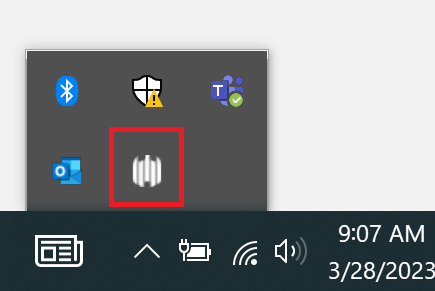
Yesterday TSS deployed a security update for Windows laptops called Sentinel. We have received several questions asking how you can tell if it has been installed. All computers who have Sentinel installed have an icon in the task bar area. It tells that agent successfully installed and it looks like the image (five white curved lines in a row at varying levels in height) in the picture below.

Have a great night! 

“I Like to Move It, Move it” Register Today!

Pickleball is the fastest growing sport in America!

Get fit and have fun this spring learning to play pickleball, badminton or yoga at Shoreline Community College with Continuing Education!

Our NON-CREDIT classes are reasonably priced for 18 sessions and start April 12th . Bring a friend!

For information and to register: Shoreline Community College (campusce.net)

System Outage Update March 27, 2023

Good afternoon, 

Zoom Forum 

Tomorrow we are hosting another campus forum via Zoom at 10:00am PST. As we did last week, we will open the floor for operational questions. If you have a question you’d like to submit, please e-mail it to cchiappa@shoreline.edu by 9:00am tomorrow 3/28/23. 

New Security Software for Laptops 

Today TSS deployed a new security software on Windows laptops called Sentinel. You will see two (2) notifications on your laptop as this occurs indicating the deployment of Sentinel and another confirming when Sentinel is deployed.  

This update is for your laptop only. Please do NOT use your desktops at this time, and continue to leave them unplugged/without a power source.  

As a general guideline, TSS recommends rebooting your machine at least once a week. 

If you have questions about this, please contact support@shoreline.edu.  

One Drive 

We have received several questions specific to OneDrive. Please note that OneDrive Instructions have been updated for both Mac and Windows machines and can be found here. 

FAQS 

Our FAQs have been updated on the support.shoreline.edu site. We will continue to update them throughout the week. 

Have a great night!