UPDATE 5/11/26 9:15am: Canvas Outage Update & Instructions for Faculty

Canvas access has been restored for Shoreline College users following additional security review and coordination between SBCTC, Instructure, and independent cybersecurity partners. 

At this time, we have no evidence that Shoreline College login details were exposed as part of this incident. However, we encourage all students and employees to remain vigilant for phishing attempts or suspicious messages related to Canvas or the recent outage. 

You may now resume using Canvas and related instructional tools. Some users may be prompted to re-authorize access to connected applications such as Panopto, or other integrated tools. If prompted while accessing legitimate college systems, this is expected behavior. Please note that third party tools like Cengage, Pearson, McGraw Hill, etc. may take a while to reconnect today. 

Faculty and instructional teams: You may wish to review and update assignments, quizzes, due dates, or other course activities impacted by the outage. Please continue communicating directly with students regarding any course-specific adjustments or expectations. 

According to information shared by Instructure and its independent forensics partner, there is currently no evidence that passwords, Social Security numbers, financial information, or other highly sensitive personal information were exposed. The investigation remains ongoing, and additional details may continue to emerge as reviews are completed. 

We appreciate your patience and will continue to share updates if additional confirmed information becomes available. 
UPDATE 5/8/26 3:30pm: Canvas Outage Update & Instructions for Faculty

While some colleges may have begun restoring access to Canvas, Shoreline College will continue restricting access through the weekend out of an abundance of caution while additional security reviews are completed.  After speaking with our unions and other college leadership, we feel this is the best option to pursue in a situation that is continually evolving. 

The college’s Incident Response Team will reconvene at 8:00 a.m. Monday morning to review the latest information and determine next steps. We will provide another campus update shortly thereafter. 

IMPORTANT CANVAS INSTRUCTIONS 

If you are currently logged into Canvas on either your computer or mobile device, please log out of Canvas on all devices. 

CANVAS ALTERNATIVES & FACULTY INSTRUCTIONS 

While Canvas remains inaccessible, faculty and staff should work directly with students to establish alternative methods for communication, distributing course materials, and receiving assignments as appropriate. Fortunately, other college systems, including ctcLink, Outlook email, and Microsoft Teams, continue to function normally and should be used for communication and course support during this interruption. If you need support setting any of these alternative options up, please send a message to eLearning@shoreline.edu and someone on the eLearning team will reply as soon as they are able. 

If you anticipate challenges continuing instruction during this interruption, please reach out to your unit administrator to discuss available support and next steps. In the meantime, please make sure you are communicating directly with your students via email regarding expectations, course continuity, and any adjustments for your individual classes. Yesterday we sent an email with instructions for accessing your roster via ctcLink in case you need assistance. 

Students will also be receiving an update, as well as instructions for how to update their email address in ctcLink as we have been getting reports of several bounce back emails. 

Again, we understand this situation is disruptive and appreciate your continued patience and flexibility as we work through this incident. We will continue to share updates as they become available. 

Canvas Outage Update & Instructions for Faculty

At approximately 1:00 p.m. today, Canvas experienced a nationwide outage impacting access to online courses and related services. At this time, we have not received confirmation regarding the cause of the outage or an estimated timeline for restoration of service.

The college is actively monitoring the situation and remaining in communication with relevant partners as updates become available. 

Our Incident Response Team will reconvene tomorrow morning to discuss possible next steps should this become a prolonged outage.

In the meantime, please make sure you are communicating directly with your students regarding any course impacts or alternative arrangements. Faculty may access directions for pulling class rosters and student email addresses from ctcLink.

We understand the disruption this may cause for students, faculty, and staff and appreciate your patience as we work through the situation. Additional updates and guidance will be shared as more information becomes available.

Canvas data breach

Shoreline College is aware of a recently reported cybersecurity incident involving Instructure, the company that provides Canvas. According to public reporting, the threat actor claims the incident involved data associated with approximately 9,000 educational institutions worldwide. This incident was not limited to Shoreline College. Instructure has stated that its investigation is ongoing and that the incident has been contained.

Based on Instructure’s current update, the information involved may include certain identifying information for users at affected institutions, such as names, email addresses, student ID numbers, and messages among users. We also want to clarify that our Canvas environment does not store additional user contact or sensitive personal information such as addresses, financial information, dates of birth, Social Security numbers, or other government identifiers.

Instructure has also reported taking precautionary steps, including revoking privileged credentials and access tokens, deploying security fixes, rotating certain keys, and increasing monitoring across its platforms.

Because names, email addresses, student ID numbers, and Canvas messages may have been involved for some affected institutions, please be alert for suspicious emails that reference Canvas, coursework, enrollment, grades, financial aid, or account access. Do not click unexpected links, open unexpected attachments, or provide your password or personal information in response to an unsolicited message.

Please remember:

  • Shoreline College will never ask for your password by email, text, or phone.
  • Use only official college websites and login pages to access Canvas and other college services.
  • Report suspicious messages to Technology Support Services (TSS) at support@shoreline.edu.

If you experience trouble accessing a Canvas-integrated tool, you may be asked to check the “authorize” button when any external tools are launched. This includes textbooks and external applications like Panopto. You may also reach out to eLearning Services to ask for assistance at elearning@shoreline.edu.

At this time, we are continuing to monitor Instructure’s status and updates and will share additional information if we learn more about the impact to our users.

Thank you for your attention and caution.

Important News and Updates from Campus Safety

Today we have a few important updates from our Campus Safety Team as we continue working to create a welcoming, supportive, and responsive environment for everyone here at Shoreline. 

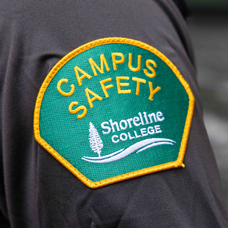
A New Name: Campus Safety 

Green patch that says "Campus Safety"  in yellow.

You may have already noticed the first change.  The Safety and Security department is now known as Campus Safety.  This is a name that many colleges are also implementing, and the update better reflects a people-centered approach focused not just on security, but on care, visibility, and connection across campus.   

Staffing Updates 

We’re also pleased to share some updates to our Campus Safety team: 

Have you met Bret yet?

Photo of Bret, the Director of Campus Safety.

Bret joined Shoreline College earlier this year as Director of Campus Safety, bringing a strong background in emergency preparedness and a deep commitment to supporting campus communities. Most recently, he served as the Assistant Director of Emergency Preparedness, Health & Safety at Edmonds College, where he helped ensure campus readiness, responded to calls for service, and supported the safety and well-being of students, employees, and visitors. 

Bret is originally from Snohomish and graduated from Snohomish High School in 2003. Following graduation, he served on active duty in the United States Coast Guard for 10 years, with duty stations across the Great Lakes in Michigan, the San Francisco Bay Area, and the Oregon Coast. 

After his honorable discharge, Bret pursued his education using his Post-9/11 GI Bill, enrolling at Edmonds College in 2017. He went on to earn both an Associate of Applied Science (AAS) and a Bachelor of Applied Science (BAS). During this time, he was appointed VA Program Manager at the Veterans Resource Center, where he supported veterans and their dependents in achieving their educational goals and navigating VA education benefits. 

Bret later returned to serve as Assistant Director of Emergency Preparedness, Health & Safety at Edmonds College, where his work focused on emergency planning, accident and injury prevention and response, fire and life safety, and broader campus safety and security operations. 

In his free time, Bret enjoys spending time with his two cats, watching sporting events, and falling asleep to true crime shows in the background. 

Campus Safety Team 

  • Bret Crawford – Campus Safety Director* 
  • Emiliano Gamboa – Campus Safety Lieutenant 
  • Mary Lou Ames – Program Specialist 3 
  • Officers:  
    • Tom Dewey* 
    • Ethan Kasberg* 
    • Michael Erga 
    • Han Nguyen* 
    • Nathan Torrez 
    • Christopher Vaughn 
    • Roger White* 
    • Shawn Wilkerson 
  • Shuttle Bus Drivers:  
    • Dennis ‘Butch’ Carlson 
    • Puddu ‘Junior’ Dawes,  
    • Gyanendra Muni ‘Mr. Muni’ or ‘Muni’,  

*Denotes a new employee 

This team is here to support students, employees, and visitors every day, and we encourage you to say hello when you see them around campus. 

New Uniforms 

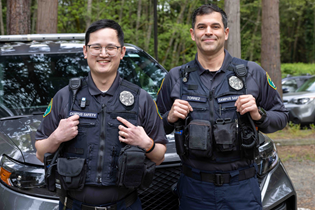
Photo of two officers in the new, dark blue Campus Safety uniforms.

Starting this month, you may also notice our team in new uniforms. These updates include our new Shoreline branding, better quality materials that will last longer, and a look that helps distinguish our team from other groups that frequent campus. The goal is simple: to make Campus Safety more visible, approachable, and recognizable to our community. 

We’re grateful for the work this team does every day to support our campus. As always, if you have questions or would like to learn more about Campus Safety services, please don’t hesitate to reach out at campus.safety@shoreline.edu