TSS Deploying LAPTOP New Security Software – What You Will See!

Good Morning Colleagues,

TSS is deploying a new security software called Sentinel. You will see two (2) notifications on your laptop as this occurs indicating the deployment of Sentinel and another confirming when Sentinel is deployed.  

This update if for your laptop only. Please do NOT use your desktops at this time, and continue to leave them unplugged/without a power source.

If you have not yet seen this update, please restart your laptop to implement it. Questions can be submitted to support@shoreline.edu.


Thank you!

Veronica Zura
Executive Director of Human Resources

Shoreline Community College
www.shoreline.edu  |  206.546.7858

[PIO] SBCTC Legislative News | March 24, 202

The eleventh edition of Legislative News for the 2023 session is posted: Senate budgets released, committees hear College in the High School fee elimination, nursing education bills

Washington state will have almost $500 million less in its budget over the next two years, according to projections released Monday by the Washington State Economic and Revenue Forecast Council. Also on Monday, the Senate released its version of the capital budget, holding a hearing that afternoon. The Senate on Thursday released its version of the operating budget, with a hearing held this afternoon. 

Baydaa Alshatee has this week’s interns’ update: Support Senate Bill 5702!

I am a student senator at Everett Community College, and one of our focuses for fall quarter was housing insecurity. For a variety of reasons, many students are at risk or have experienced housing insecurity. As a senator, I get to interact with the student body as their peer and be a voice for them. That is how I made many friends who shared their stories with me.

________________________________________

Subscribe to the SBCTC Legislative News eList. Please do NOT select the Digest option.

NOTE: To avoid duplication, members of community and technical college email group distribution lists (SBCTC staff, PIOs, presidents, advancement, trustees, development officers) need not join this eList.

Washington State Board for Community and Technical Colleges compassKatie Rose

Communications and Marketing Associate

Washington State Board for Community and Technical Colleges

krose@sbctc.edu • o: 360-704-4367 • f: 360-704-4415

sbctc.edu • Twitter: @SBCTCWashington • Facebook: @WASBCTC

System Outage Update March 24, 2023

Good afternoon,

First of all, I want to say a huge congratulations to the faculty of our Nursing Program for graduating the largest class ever yesterday, with forty new nurses proudly walking across the stage!

Media Inquiries

Yesterday we had several media outlets visit campus, and we did issue a press release about the ransomware incident. As a gentle reminder, please note that all media inquiries or questions should be funneled directly through Cat Chiappa, our new Executive Director of Strategic Communications and Marketing. The reason for this is that the investigation is ongoing, and we want to make sure that we are streamlining all updates and communication for consistency.

Wi-Fi Hotspots

In other news, TSS has deployed Wi-Fi hotspots throughout campus and are working to make them as effective as possible. We hope to have a map showing their locations around campus early next week.

OneDrive

We have received several questions about how to restore a OneDrive, and detailed instructions can be found here

CybersecurityRecommendations

Many of you have asked about best practices for general cybersecurity. Here are a few recommendations to consider:

  • Remember to stay vigilant against suspicious communications. If you receive an email, text or phone call from a sender you do not recognize, do not respond, open the messageor download attachments. Only click on links or attachments from emails you trust. If you think you have received a suspicious communication, please let your supervisors know so that TSS may assist you.
  • Always use strong passwords. Strong passwords typically include a combination of letters, numbers, and symbols. Do not repeat or use the same passwords across accounts.
  • It is always advisable to regularly review and monitoryour accounts. If you notice any unusual activity, it is recommended that you contact that account institution immediately.

FAQs

Lastly, we received several great questions in today’s Zoom meeting. We will continue to update the FAQ list next week, and you can find the current iteration here.

Enjoy your weekend!

Jack Kahn

ctcLink Faculty Help – Tips for submitting grades

Here are timely tips and resources for submitting Winter 2023 final grades in ctcLink, as well as a list of drop-in Zoom support dates if you have questions.

Resources

  • Working around the Shoreline website outage
  • How to Submit Grades
  • Drop-In Zoom Support with Heather!
  • Friday, March 24, 3-4pm
  • Monday, March 27, 10-11am
  • Tuesday, March 28, 2-3pm
  • Shoreline Support ZoomRoom

———————————————————-

Tips for Grades in ctcLink

  • Save Grades Often: ctcLink times out after a few minutes of inactivity.  If you are timed out of ctcLink, you will lose the grades you have already entered unless you have saved them before you were timed out. If you are calculating grades as you are entering them, you will want to save your grades every few minutes to prevent losing the grades you already entered if you are timed out of ctcLink.
  • Save Grades Before Changing Approval Status to Approved: Changing the Approval Status of your grade roster to Approved without first saving the grades you have entered will erase any grades you have entered but not saved. Save your grades before changing the Approval Status from Not Reviewed to Approved.
  • Save Approved Status: Your grades are not submitted until you change the Approval Status from Not Reviewed to Approved, and you Save the Approved status. 
  • You Can Edit Grades After Approved Status is Saved: Prior to Enrollment Services posting grades to students, you can edit grades you have entered and approved by changing the Approved Status back to Not Reviewed, revising the grades you entered in the grade roster, saving the revised grades, changing the Approval Status back to Approved, and then Saving the Approved Status again. Note that is it necessary to Save the grades you submitted in the roster and Save the Approved status.
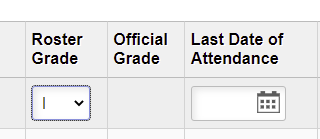
  • Enter Date of Last Attendance: If you enter a 0.0, NP, I, or Z in the grade roster, you will be prompted to enter a Date of Last Attendance for the student using a calendar widget. You will not be able to save and approve your grade roster if a required Date of Last Attendance is missing. For an online class, you may use the date a student last submitted work in Canvas. If the student has never attended class, you may use the first day of the quarter. 
screenshot roster grade, official grade and last date of attendance entry fields
  • Official Grade Is Entered for Student Who Withdrew: Enrollment Services will have entered an Official Grade of W for students who withdrew from your class during the W period. You do not need to enter a grade or fill in a Date of Last Attendance. 
Official Grade Is Entered for Student Who Withdrew: Enrollment Services will have entered an Official Grade of W for students who withdrew from your class during the W period. You do not need to enter a grade or fill in a Date of Last Attendance. 
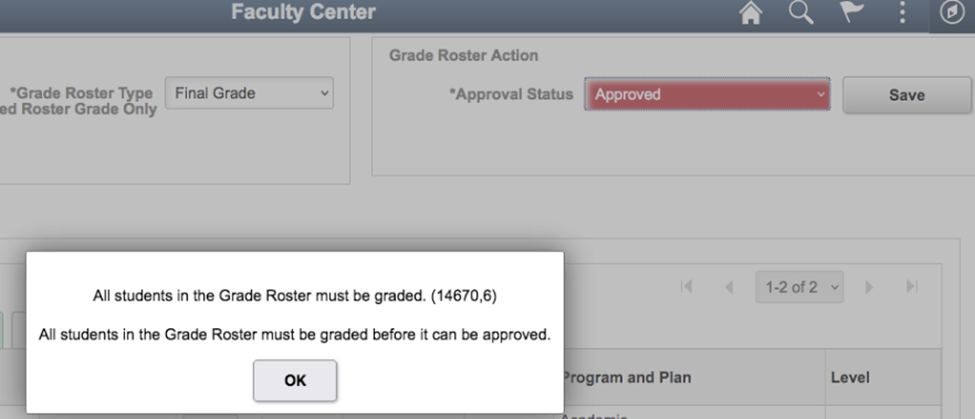
  • Error Message When Trying to Save Approved Status: If you see the error message in the screen shot below when trying to Save your grade roster status after changing the Approval Status to Approved, check to make sure you have entered grades for all the students on the roster. You may have missed students whose names are on a second page of the roster. The grade roster shows only 20 students per page. If you have more than 20 students enrolled in your class, look for additional students on a second page. 
screenshot of error message Official Grade Is Entered for Student Who Withdrew: Enrollment Services will have entered an Official Grade of W for students who withdrew from your class during the W period. You do not need to enter a grade or fill in a Date of Last Attendance. 
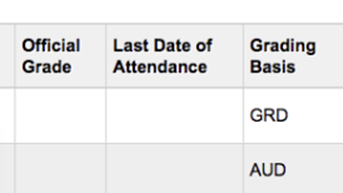
  • Official Grade Not Entered for AUD Students: If you have a student who is Auditing your class, you may find that the Official Grade is missing from the grade roster. There should be an N entered in the Official Grade column for a student who is Auditing a class. The screen shot below shows a Grading Basis of AUD with the Official Grade of N missing. Instructors cannot enter an N. If there is no N entered for an AUD student, email Enrollment Services <enrollmentservices@shoreline.edu> with the Class Number and Student ID and ask them to enter the N for the student. 
screenshot Official Grade Not Entered for AUD Students: 
  • Students Missing from Grade Roster: Students who were dropped for non-payment may have remained active in Canvas. If you have students who are active in Canvas but whose names do not appear on your grade roster, it is likely that they were dropped for non-payment. You can look up a student’s class schedule in Advisor Center to see whether the student has been dropped from your class: How do I view a student’s academic information? If the student had a plan to pay their balance and they have been participating in the course, Enrollment Services may still be able to add them back to the class. You can ask the student to contact Enrollment Services <enrollmentservices@shoreline.edu> to rectify a mistaken drop for non-payment.
  • Questions? Ongoing help is available from the ctcLink support team if you “Submit a request” via the Shoreline Support Center. Drop-In Zoom support is also available at www.shoreline.edu/zoomroom. Dedicated faculty support available on the times listed at the beginning of this message. But you can drop in outside of those hours and the support staff will do their best to assist.

Best regards,

HM

Heather Munsell

Shoreline Community College

Communication studies faculty

ctcLink Faculty Lead

Landscape Update to Campus

Hello Campus Community,

We have finalized our contract with a landscape contractor.  You’ll see a landscape crew on campus starting this week until the end of September 2023.  This work will be done in phases based on the areas identified.  Feel free to reach out if you have any questions. 

Thanks,

Kimberlee Clark