Network interruption scheduled for Sun., Feb. 12
February 3, 2017 by Leave a Comment
There will be a short, 10-minute interruption to campus network services on Sun. Feb. 12 between the hours of 8-10 p.m.* This interruption is part of a K20 maintenance operation.
If you have any question, please submit your question to Technology Support Services helpdesk at help.shoreline.edu.
*(Note: the interruption was originally posted as occurring on Sun., Feb. 5 between the hours of 8-10 a.m.)
Correction: Network interruption scheduled for Sun., Feb. 12
January 31, 2017 by Leave a Comment
There will be a short, 10-minute interruption to campus network services on Sun. Feb. 12 between the hours of 8-10 p.m.* This interruption is part of a K20 maintenance operation.
If you have any question, please submit your question to Technology Support Services helpdesk at help.shoreline.edu.
*(Note: the interruption was originally posted as occurring on Sun., Feb. 5 between the hours of 8-10 a.m.)
Campus Directory information now in Outlook
November 17, 2016 by 2 Comments
You’ve always been able to right-click on an email address in Outlook and choose “Open Outlook Properties” or “Open Contact Card” to get a quick look at the office or phone number for an employee. However, if you’ve used that trick you may have noticed that that information didn’t change if the person moved to a new office or got a new phone number after they were hired.
That Outlook data is now being updated once a day from the online Campus Directory, so you should be able to rely on it for the current office (room), phone number, department, and job title, assuming the employee and their division have kept their information up-to-date in Campus Directory.
Contact Gavin Smith at gavinsmith@shoreline.edu with any questions.
Class Schedule updated for classes with multiple times
August 16, 2016 by Leave a Comment
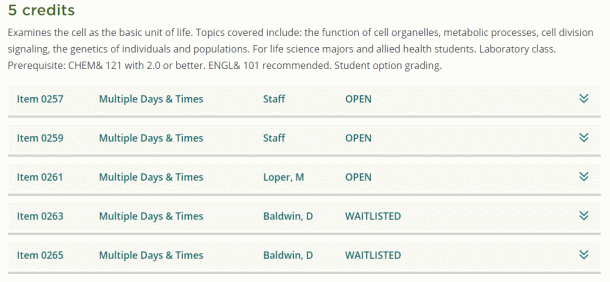
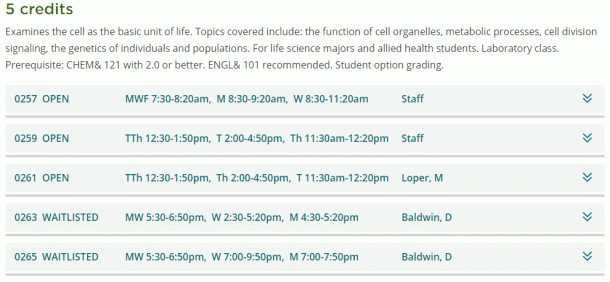
The initial design for Class Schedule for the new website showed “Multiple Days & Times” as the summary for class sections with labs, so students needed to open each section to see days and times. In response to campus feedback, the Web Workgroup worked with affected departments to come up with a modified design that shows all times and days each class meets at a glance. This should make it easier for students to quickly see which classes in the schedule best meet their needs. Please see the before and after example below.
Before:
After:

 Day at a Glance
Recent Comments