![Free Training lynda[2]](https://daag.shoreline.edu/wp-content/uploads/2016/08/free-training-lynda2.jpg?w=610)
Brush up on your skills with Lynda.com – free for students and staff
August 3, 2016 by Leave a Comment
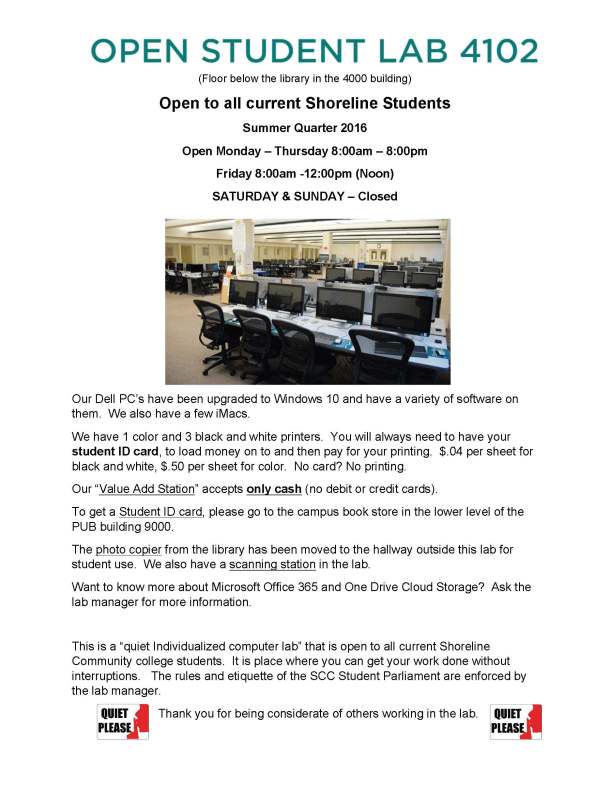
Computer Lab hours for Summer 2016
June 23, 2016 by Leave a Comment
Please make sure your students are aware that the 4102 Computer Lab is open to all current Shoreline Community College students this summer!
Check out Lynda.com – free to Shoreline staff and faculty!
May 12, 2016 by Leave a Comment
Did you know Lynda.com is available for free to Shoreline Community College faculty, students, and staff? With summer coming, now is the perfect time to see what Lynda.com has to offer.
-TSS
![Poster lynda May 2016[2]](https://daag.shoreline.edu/wp-content/uploads/2016/05/poster-lynda-may-20162.jpg?w=610)
WINDOWS 10 AND OFFICE 2016 – NOW AVAILABLE!
April 8, 2016 by Leave a Comment
Windows 10 is currently being deployed across campus in general computing and instructional labs, smart classrooms, and on system replacements. The latest Microsoft operating system and desktop productivity suite are now available within the Software Center allowing you the flexibility to install on your schedule. Updating your system is only a click away. TSS strongly encourages everyone to upgrade their office computers to Windows 10 and Office 2016 at their earliest possible convenience.
If you presently use a Windows Desktop or Laptop and you are unfamiliar with how to find the Software Center Application on your system, please review this document available on the TSS Intranet page.
If you presently use an Apple iMac, MacBook, etc., please contact TSS directly for additional information.
Should you have any questions, comments or concerns whether your system will accept these updates or simply wish a little assistance getting started, please let TSS know and we will be more than happy to assist.
Windows 10 coming to 4102 Student Computer Lab
February 29, 2016 by Leave a Comment
Beginning spring quarter, the 4102 Student Computer Lab computers will have been upgraded to the new Windows 10 operating system.
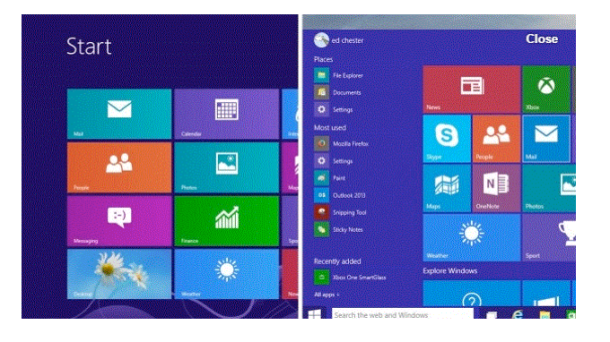
 Microsoft has listened to its users and has combined the best of Windows 8.1 Windows 10 which created a smart mix of the new and the familiar.
Windows 8.1 had the “Start Screen” with live tiles. Windows 10 brings back the start menu, with the classic options on the left and live tiles on the right.
If you’d like more information you can visit “lynda.com” & watch: Windows 10 Tips and Tricks to familiarize yourself with the innovations.
Open a browser and in the address line type lynda.com.
In the top right corner you’ll see the words “Log in”
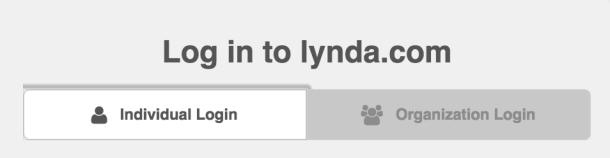
Please click there.
1) Click on the “Organization” tab BEFORE you just try to log in.
Type: http://www.shoreline.edu
2) Then log in with your full school email and password
Students = user name@go.shoreline.edu & password
Faculty/Staff = user name@shoreline.edu & password

 Day at a Glance
Recent Comments