Shoreline’s Virtual Campus Celebrates National Distance Learning Week

SCC is celebrating National Distance Learning Week (NDLW) during Nov. 10-14, 2014.  Sponsored by the United States Distance Learning Association, NDLW seeks to promote and celebrate the tremendous growth and accomplishments occurring today in distance learning programs.

Currently, more than 3.5 million U.S. college students are taking online courses and/or earning online college degrees.

Shoreline’s Virtual Campus serves 891 online students (full-time equivalent students aka FTEs), an increase of 25% since 2010. The Virtual Campus serves more than fully distant students though.  It is dedicated to empowering a wide range of learners to succeed by increasing access to high quality and innovative educational experiences, complemented by a full suite of support services, all offered at times and places most convenient to learners.  Hybrid learners–who take classes that combine online with on-ground learning–have grown the most substantially at the college, in fact.  Shoreline serves 925 hybrid learners (FTEs), an increase of 95% since 2010.

Tip for logging into Respondus “Lockdown Browser”

Here is some great information for students about logging into the Respondus “Lockdown Browser” on campus. This browser is designed for students taking online tests and “locks” them out of using other applications or web browsers until the test is completed.

For more information on this program, contact eLearning or TSS.


respondus

Respondus Lockdown Browser is currently installed in the 4102 student lab, the 4214 lab and the reference computers. To access Respondus, first log in to your student account not “guest”. Second, make sure you do not have other web browsers open or you will have to close and retry. Third, look for a shortcut icon on the student desktop that looks like the one to the right.

The new software version does not have the word “Respondus” on the icon which can be a bit confusing. From the desktop once you double click to open the program, you will also need to choose “Canvas Shoreline Community College” by selecting the down arrow on the choose server window.

From the start screen with the apps, you can click the down arrow at the bottom right side of the screen to load all the current apps. Then scroll over (or touch the screen to slide to the left) and look for the program “Respondus”. There you will again see the same icon as pictured above. (Lockdown Browser).

Canvas trainings

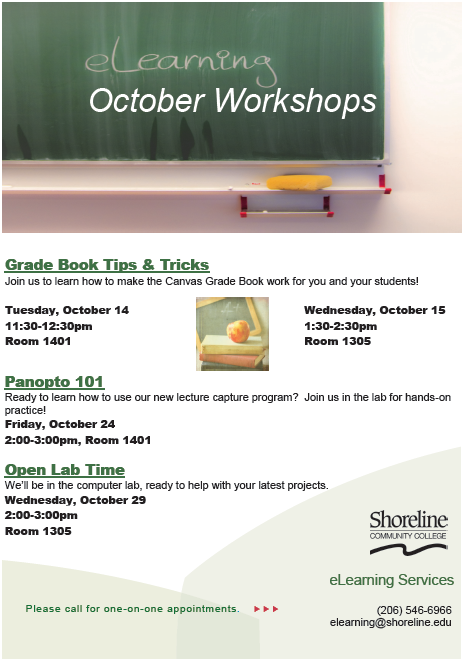
elearningWe hope you can join us for our eLearning Training Opportunities this month!  Bring your ideas, your questions and we will help you work them out.

During the Canvas Grade Book training on Wednesday, Oct. 15 (room 1305 at 1:30 p.m.), we will show you a few tips and tricks to make your grade book work well for both you and your students.  We can also help you configure extra credit that works in quizzes or discussion and how to build and use rubrics to reduce your grading workload.

In Panopto 101 on Friday, Oct. 24 (room 1401 at 2 p.m.), we will explain both the Panopto Viewer and the Panopto Recorder.  We will show you how to set up and make your first recording.  We are also available to help move recordings around, upload old Tegrity recordings into Panopto and much more!

At the end of the month, we will have eLearning Open Lab time on Wednesday, Oct. 29 (room 1305 at 2 p.m.) so that you can work on any of your online teaching projects.

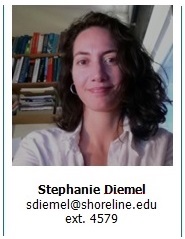
Meet Stephanie Diemel: New eLearning Faculty-in-Residence

Stephanie DiemelDgD-RwjOI5UEJADV4EEabV2n is a professor of physics and astronomy, and has been with SCC since 1998.  She is an active participant in the Shoreline eLearning Community on campus, and does not hesitate to share her technical expertise with students, faculty and staff.  Stephanie received her M.S. in Physics from San Diego State University and is currently pursuing a Graduate Certificate in Instructional Design from the University of Wisconsin.  As part of her commitment to excellence in online teaching, she had her course PHYS 110 – Concepts of the Physical World certified by Quality Matters in 2013, and today she is a QM Peer Reviewer.

Please, welcome Stephanie as our new eLearning Faculty-in-Residence for the academic year 2014-2015.

eLearning Open Lab for Canvas and Panopto

How are your Fall online courses coming together?  Do you have any questions about Canvas or Panopto?  eLearning services will have the computer lab in 1305 open for your use and will be standing by ready to help on September 16 at 11 a.m.!

If you can’t make this session, there will be another Open Lab next Wednesday, Sept. 24 from 1:15 – 2:15 p.m., also in 1305.

Looking for a more in-depth training on Panopto?  Please join us for a Panopto training this Friday, 9/19, from 1:00 – 2:00 p.m. in Room 1301.

If none of these with your schedule, please let us know to schedule one-on-one appointments.