System Outage Update March 28, 2023

Good afternoon, 

Today I just have one quick update for you. 

Sentinel Security Update 

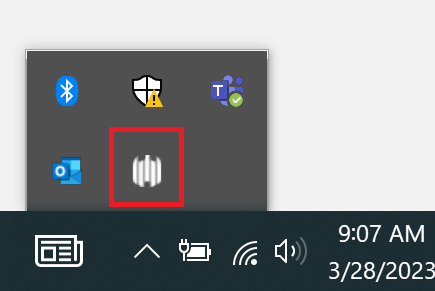
Yesterday TSS deployed a security update for Windows laptops called Sentinel. We have received several questions asking how you can tell if it has been installed. All computers who have Sentinel installed have an icon in the task bar area. It tells that agent successfully installed and it looks like the image (five white curved lines in a row at varying levels in height) in the picture below.
Have a great night! 

“I Like to Move It, Move it” Register Today!

Pickleball is the fastest growing sport in America!

Get fit and have fun this spring learning to play pickleball, badminton or yoga at Shoreline Community College with Continuing Education!

Our NON-CREDIT classes are reasonably priced for 18 sessions and start April 12th . Bring a friend!

For information and to register: Shoreline Community College (campusce.net)

System Outage Update March 27, 2023

Good afternoon, 

Zoom Forum 

Tomorrow we are hosting another campus forum via Zoom at 10:00am PST. As we did last week, we will open the floor for operational questions. If you have a question you’d like to submit, please e-mail it to cchiappa@shoreline.edu by 9:00am tomorrow 3/28/23. 

New Security Software for Laptops 

Today TSS deployed a new security software on Windows laptops called Sentinel. You will see two (2) notifications on your laptop as this occurs indicating the deployment of Sentinel and another confirming when Sentinel is deployed.  

This update is for your laptop only. Please do NOT use your desktops at this time, and continue to leave them unplugged/without a power source.  

As a general guideline, TSS recommends rebooting your machine at least once a week. 

If you have questions about this, please contact support@shoreline.edu.  

One Drive 

We have received several questions specific to OneDrive. Please note that OneDrive Instructions have been updated for both Mac and Windows machines and can be found here. 

FAQS 

Our FAQs have been updated on the support.shoreline.edu site. We will continue to update them throughout the week. 

Have a great night! 

TSS Deploying LAPTOP New Security Software – What You Will See!

Good Morning Colleagues,

TSS is deploying a new security software called Sentinel. You will see two (2) notifications on your laptop as this occurs indicating the deployment of Sentinel and another confirming when Sentinel is deployed.  

This update if for your laptop only. Please do NOT use your desktops at this time, and continue to leave them unplugged/without a power source.

If you have not yet seen this update, please restart your laptop to implement it. Questions can be submitted to support@shoreline.edu.


Thank you!

Veronica Zura
Executive Director of Human Resources

Shoreline Community College
www.shoreline.edu  |  206.546.7858

System Outage Update March 24, 2023

Good afternoon,

First of all, I want to say a huge congratulations to the faculty of our Nursing Program for graduating the largest class ever yesterday, with forty new nurses proudly walking across the stage!

Media Inquiries

Yesterday we had several media outlets visit campus, and we did issue a press release about the ransomware incident. As a gentle reminder, please note that all media inquiries or questions should be funneled directly through Cat Chiappa, our new Executive Director of Strategic Communications and Marketing. The reason for this is that the investigation is ongoing, and we want to make sure that we are streamlining all updates and communication for consistency.

Wi-Fi Hotspots

In other news, TSS has deployed Wi-Fi hotspots throughout campus and are working to make them as effective as possible. We hope to have a map showing their locations around campus early next week.

OneDrive

We have received several questions about how to restore a OneDrive, and detailed instructions can be found here

CybersecurityRecommendations

Many of you have asked about best practices for general cybersecurity. Here are a few recommendations to consider:

  • Remember to stay vigilant against suspicious communications. If you receive an email, text or phone call from a sender you do not recognize, do not respond, open the messageor download attachments. Only click on links or attachments from emails you trust. If you think you have received a suspicious communication, please let your supervisors know so that TSS may assist you.
  • Always use strong passwords. Strong passwords typically include a combination of letters, numbers, and symbols. Do not repeat or use the same passwords across accounts.
  • It is always advisable to regularly review and monitoryour accounts. If you notice any unusual activity, it is recommended that you contact that account institution immediately.

FAQs

Lastly, we received several great questions in today’s Zoom meeting. We will continue to update the FAQ list next week, and you can find the current iteration here.

Enjoy your weekend!

Jack Kahn