TSS is in the process of updating @shoreline.edu email accounts from an on-premise system to one that is cloud based. For the staff of TSS, this will alleviate having to manage physical servers. For faculty and staff, email will likely continue to be what everyone knows and loves, but there might be some slight changes along the way.
Yesterday we notified users that postini had been disabled. As a result, today users might have seen some messages filtered into Junk E-mail. Below is a real-life example: Today I found that the Day At A Glance email message went to the Junk E-mail folder.
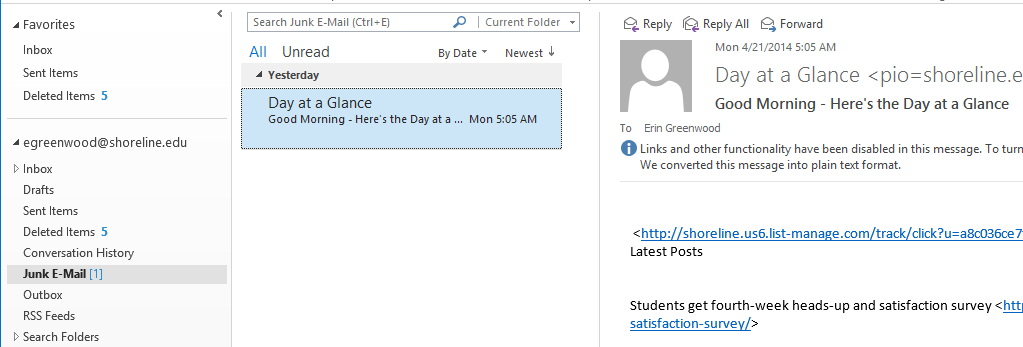
Here is what you can do to correct messages that have inaccurately gone to the Junk folder.
- Right Click on the Message that is not Junk. The following menu is displayed:
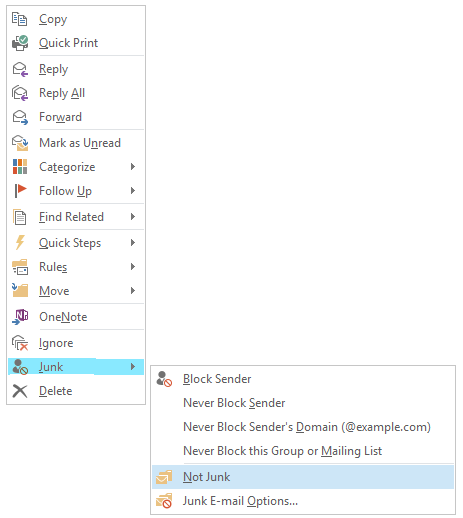
- From the menu, hover on “Junk” and then click “Not Junk”
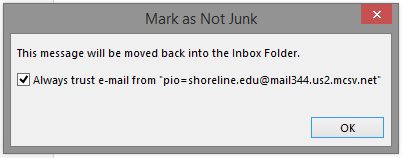
- The message will be moved back into the usual folder–the Inbox or to another folder if a rule is in place.
- Outlook will provide an option for similar messages to skip the Junk folder in the future:

 Day at a Glance
Leave a comment