A new tool has been added to Outlook that will go above and beyond marking items as Junk. (Review the post about how to do that here.) Please note: If you do not see the options shown below, please close Outlook and then reopen it.
The new tool will Report Junk mail to Microsoft so they can better hone what is considered junk. You can use this tool from the Ribbon or from a right-click.
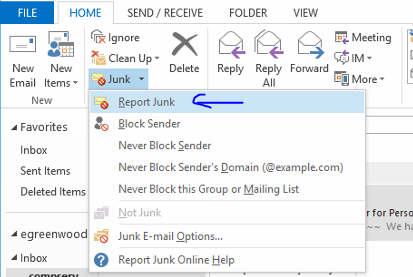
When you use this tool, you will be prompted to confirm that you want to report the message as Junk. Click “Yes” and your message will be moved to the Junk E-mail folder and Microsoft will take notes.
As more people use this tool, Microsoft will provide better Junk E-mail filtering.

 Day at a Glance
Leave a comment