A common question we field in eLearning is regarding pdfs and accessibility. Many faculty use pdfs in their instructional materials in order to preserve formatting and prohibit editing. Can a pdf be read by a screen reader? The answer is yes, but it takes some work to structure the document such that a screen reader will be able to parse it in a meaningful way. Adobe and Microsoft have both written guides to help create pdfs that are properly “tagged” for screen reader accessibility.
If you want to learn more, join us for our Accessibility Training Sessions on campus this week!
Wednesday, April 27, 1:30-3:00pm Room 4214
5 Steps to Accessible Syllabi
Quickly learn the 5 steps that make documents accessible! We’ll be at computers so please bring a syllabus or other document that you’d like to improve.
Thursday, April 28, 1:30-3:00pm Room 4214
UDOIT Party
What does UDOIT mean?! It is finally easy for anyone to check their Canvas classroom for accessibility. UDOIT is a great new tool that is inside Canvas – a few clicks and it has checked your full course for Accessibility. It also provides information on how to fix the issues! Our FLC has also put together a handy checklist if you want to check your course that way. FLC Members will be present to show you how to use the tools and to help you quickly make improvements.
Friday, April 29 11:30-12:30pm, PUB
“Digital Accessibility in Higher Ed: Risk Assessment, Responsibility and Benefits” with Dr. Janet Sedgley, University of Montana
It feels like a new buzz phrase – digital accessibility. Those steeped in it, throw the term around daily. Most others don’t find the term very accessible (aka approachable). More individuals are starting to understand a little about how to create accessible Word documents and that web images require alt tags. We have added more steps to our work processes. Why?
Let’s take a step back and get a general view of what’s happening with higher education and digital accessibility. Is it truly an issue that needs our attention, how involved are each of us and what is higher education’s return on investment as far as digital accessibility.
This presentation is part of the T&L Conference but you are welcome to attend this session even if not registered for the full conference. Please RSVP here so we have enough seats set up for you.
If you cannot attend an on campus training, please reach out to eLearning Services and we can set up individual sessions as needed.

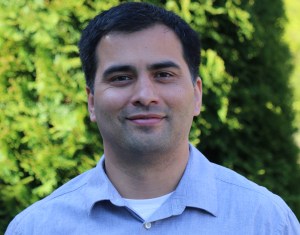 Sunny Ybarra started working as an Advisor at Shoreline’s Advising office at Shoreline on the first day of spring quarter. He will work be working as a general advisor but also supporting students in Workforce and professional/technical programs. Before coming to Shoreline, he was an Advisor at Lake Washington Institute of Technology. Prior to that he worked at Highline College in Advising and Multicultural Affairs. Before moving to Seattle, he worked as an Advisor at Spokane Falls Community College after working as a high school counselor for nearly ten years.


Recent Comments