Shoreline is coming to you!

Spring quarter at Shoreline Community College begins on April 4th. Between February 14 – March 13 you can join us at one of the local events below to learn about our programs, ask questions, and get help completing your application on the spot! 

Public Libraries. Stop by and speak with a Shoreline representative at the following locations:

 High Schools. Students and staff can stop by to meet with a member of the SCC Outreach Team:

  • Shorewood High School at the Career Center: Every Tuesday from 10:30am – 1:00pm
  • Shorecrest High School at the Career Center: Every Thursday from 10:30am – 1:00pm 
  • Other high schools: Please contact Amy Stapleton at astapleton@shoreline.edu or (206) 546-7841 

Virtual Support. Can’t meet us in person? No problem! We’re happy to help you online at one of our virtual events: 

Additional appointments can be scheduled by emailing connect@shoreline.edu or by phone at (206) 546-7841.

Day 1: Common Access Questions in ctcLink

Hi Everyone,

We are off and running with ctcLink!  We have already gotten some very good questions thus far and wanted to share the most common in case you or anyone on your team have questions after you activate your account…

If you missed the popup box that contained your new ctclink ID during the account activation, but the system says your account is activated, you can use our ctcLink ID look up tool to look it up using your old SID.

My profile details are wrong / missing. What should I do?

You can review and update your personal information using the Personal Details tile in Employee Self Service. This includes information such as:

  • Address
  • Contact details
  • Preferred Name

**Please ensure your Emergency Contact information is correct**

I work for multiple colleges. Why can’t I see Shoreline info?

This is a common issue for folks who have already set up their preferences with another college.

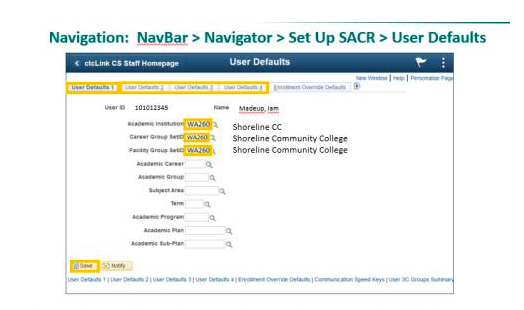
Campus Solution users can set up their Shoreline preferences using these User Defaults instructions: https://ctclinkreferencecenter.ctclink.us/m/79784/l/1302449-9-2-campus-solutions-user-defaults

I’ve clicked on the HCM tab, but I don’t see my Time Tile. What do I do?

Please use Live Chat and the Drop-in Zoom sessions to discuss with our support team. They may ask you to submit a ticket via support@shoreline.edu.

Permissions – Dude, where’s my screen?

Please troubleshoot your access issues:
Talk to co-workers to compare access
Check out articles in Technical Support Center
Use Live Chat and Drop-in Zoom sessions

Once confirmed missing access to screens/tasks in ctcLink
Please work with your supervisor and ask them to submit a request via Security Change Request Form.  Include as much info as possible including Navigation path and other info discovered in troubleshooting such as coworker with access

If you still have questions, please…

Contact Technical Support at https://support.shoreline.edu/hc/en-us. Use the chat feature to get real-time support.

Show Your SCC Pride on Phin Wednesdays!

PHIN WEDNESDAYS ARE BACK! Stop by the PUB Courtyard on Wednesday, March 2 from 11am-1pm and get some SCC swag and a Bookstore coupon to use on your next purchase! And show off your SCC spirit EVERY Wednesday by wearing Shoreline colors!

Don’t forget to support the men’s and women’s basketball teams on Saturday, March 5 at the SCC Gym when they taken on Edmonds Community College. The women kick off the action at 2pm followed by the men at 4pm. 

ctcLink Employee ctcLink Account Activation and Time Sheet Submission

Hi Campus Community,  

The time has come for you to activate your ctcLink account!! Access Account Activation Tutorial here. 

Attention Hourly and Classified Employees & Supervisors: Timesheet Creation & Submission   

  • Timesheets are due tomorrow March 1 by 10am! Join us to work step-by-step to activate your ctcLink account and then create and submit your timesheet. 
  • 2/28/22 3:00pm-4:00pm via Zoom: https://us02web.zoom.us/j/88354422244 
  • 2/28/22 4:00pm-5:00pm in person, computer lab 1304 
  • 3/1/22 8:00am-9:00am via Zoom: https://us02web.zoom.us/s/85740222949 
  • 3/1/22 9:00am-10:00am in person, computer lab 1304 

Key Dates and Timelines: 

(Click here to view all important dates)  

  • February 28th – March 4th: Employees will activate their ctcLink accounts (instruction link at the top of this email) 
  • March 7th – March 16th: Please remind students to activate their ctcLink accounts. To see the ctcLink communications going out to students, please check out the Student Communication Feed! 

Upcoming Training Sessions: 

All sessions are recorded, and you can view them on our ctcLink SharePoint site. Upcoming training sessions will be posted on the ctcLink Training & Resources page. These training sessions will help you navigate and understand ctcLink.    

Need assistance with account activation?  

ctcLink Drop-in Support for All Staff – Focus on Account Activation 

Drop in to get help with activating your ctcLink account and have other questions answered. Additional ctcLink drop-in support sessions have been created and can be viewed on the Employee Calendar. 

Zoom Link: https://us02web.zoom.us/j/81837734259 

  • 2/28/22 11:00am-5:00pm 
  • 3/1/22 9:00am – 4:00pm 

If you have questions, please visit ctcLink on our Shoreline website at https://www.shoreline.edu/ctclink/ or our Technical Support Center at https://support@shoreline.edu. 

Go-Live is here! 

Successful launch of ctcLink!

Dear Shoreline Staff,

Shoreline ctcLink launch teams were working nonstop through the week/weekend and we are affirmed through our state partners for conversion to our new system. We also have assurance that the DG6A group (the 3 WA college’s converting this weekend) went extremely well. It was a huge undertaking by so many people working over this last three years. 

For many of you this might appear to be an undertaking over this last 6 months, and with increasing assistance from our state agency project team, our staff put everything they had into making sure the go-live went according to plan. With ctcLink, our students, faculty and staff will have access to information they need when they need it, with a broad range of mobile friendly self-service tools.

As we work to further implement all components of this new system, the College ctcLink team will continue to provide you information regarding resources and training to ensure you have the best experience possible. Please expect continued weekly updates with information that matters to you. 

Congratulations to all of our Shoreline conversion teams, we are officially launched! 

Phillip J. King, Ed.D.

Vice President for Student Learning, Equity, and Success

Shoreline Community College

pking@shoreline.edu