Employee Changes Report: Sep/Oct 2018

Greetings!

Reminder – we transitioned from sharing the employee changes report via email attachment each month to a more readily available campus-wide communication method. Beginning this past February, the Employee Changes Report is found online at the HR Intranet webpage located HERE. The employee changes report for September-October 2018 can be found HERE. Please feel free to call or email with any questions.

Human Resources
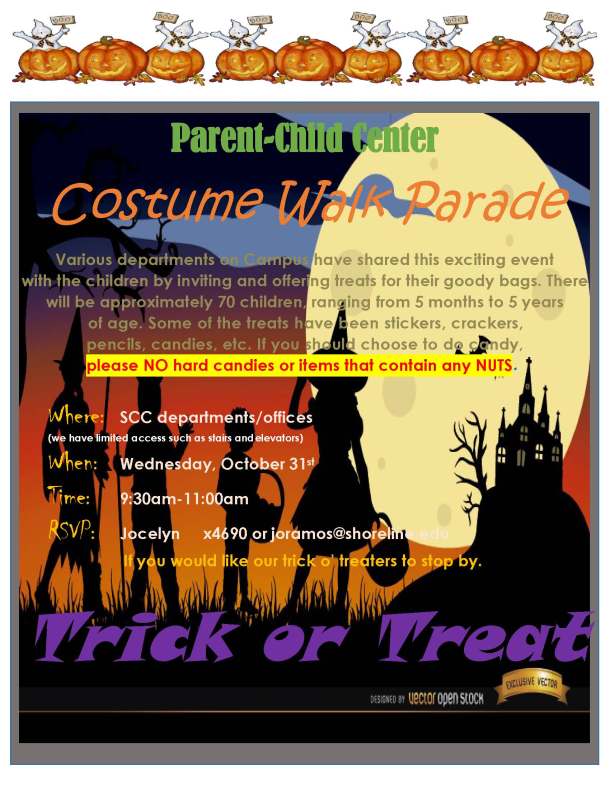
Parent-Child Center Costume Walk is coming up Oct. 31

costume walk 2018

Board of Trustees Study Session (3:00 PM) & Regular Meeting (4:30 PM) – Wednesday, October 17, 2018

The Board of Trustees will be holding its regular meeting on Wednesday, October 17, 2018 at 4:30 PM.  A study session is scheduled to precede the regular meeting at 3:00 PM.

Meeting packets: http://www.shoreline.edu/about-shoreline/board/meeting-packets-2018.aspx

October is National Disability Employment Awareness Month

Welcome to National Disability Employment Awareness Month (NDEAM)! As with every October, the federal Department of Labor sponsors the celebration of an inclusive workforce, specifically aimed at the employment of individuals with disabilities. This month, you will see posters around campus in both English and Spanish, stating this year’s NDEAM theme: “America’s Workforce: Empowering All.”

Student Accessibility Services (SAS) will post NDEAM-related topics on Twitter throughout the month, along with the hashtag #NDEAM, and we encourage others to do the same. For more information about NDEAM, or for employment resources for individuals with disabilities, contact the Community Employment Program (CEP), Student Accessibility Services (SAS), or WorkSource in the Workforce Education office.

Have You Updated Your Email Signature Yet?

In 2017, Shoreline published a College Identity Guide to ensure the correct and consistent use of the College’s identity system.

In the spirit of having “many voices, one college experience,” all Shoreline employees are asked to use a consistent email signature format to help establish a unified identity in our email communications.

Communications & Marketing has made it easy for you to “click to copy” the email signature formatting, which you can paste directly into your Outlook preferences. The signature includes:

  • Name (if including academic credentials, use periods and separate by commas)
  • Job Title
  • Name of College
  • Website and phone number
  • Two lines of optional text (such as secondary contact information or personal pronoun preferences)
  • Optional Shoreline logo (the use of any other logos must be approved by the president)

If you haven’t already done so, please visit the College Identity Guidelines web page to learn how bring your email signature up to date!