This Tech Works Great! Technology Support for Faculty & Staff

The Fall quarter is here, and we want you to succeed in using classrooms, technology on campus and hosting events. We know it does not always work out that way, and that try as we might, the technology is not as intuitive as we hoped.

Keep this list of places to contact to get assistance when it goes awry. All of these create tickets that multiple people can see and track. So, if your go-to support person is not available, someone else can step in.

Response times do vary, and some of us need more time to get things organized to best help you.  

  • Classroom Projectors, sound, and podium – email media@shoreline.edu or call 206-546-6966, if you have to leave a message, please let us know a phone or email to contact you back. 
  • Can’t login? Computer is not working, need access to apps and software – email support@shoreline.edu or call 206-546-5872. Please give as much information as possible so we can get the right person to help you. 
  • Planning an event? This guide will connect you to where you need to go and all the people involved in event planning. Click Room Rental Request to get to the form: Service – Internal Event Request
  • Is Canvas not working? Panopto on the fritz? Want to record your lectures in the new POD recording room? Do you need a zoom account? Email elearning@shoreline.edu or call 206-546-6966. 
  • There are articles and how-tos in the support center https://support.shoreline.edu/, logon as an employee with your network account and find answers to your tech questions and more. 


We look forward to helping you! 

TSS, CSS, eLearning, Learning Resources 
Classroom Support Services Information – Spring 2025

Classroom Support Services provides support of classroom AV systems. We offer training sessions on the AV systems, including the usage of the Windows PC, document camera, and video projector. We coordinate response to infrastructure concerns with Facilities Services.

We offer consultation on your ideas for using media technology tools. Media tools include Panopto for lecture capture and Zoom for video conferencing. Classroom Support Services creates and supports Zoom accounts. A/V support is provided for campus meetings and events.

Contact us by calling (206) 546-6966, emailing media@shoreline.edu, and on the Classroom Support section of the Shoreline Support Center.

We strive to respond to classroom AV issues within 15 minutes, and all support requests within 24 hours.

Please provide at least one-week advance notice for media support for meetings and events.

December 2021 Starfish Update

Greetings Shoreline faculty & staff!

As the fall quarter concludes, the Starfish implementation team would like to provide you with an update. As you are already aware, Starfish is a retention-oriented student success software that will replace Advisor Data Portal and provide our advising teams with a robust set of case management tools to facilitate a proactive student services model in alignment with the Guided Pathways framework.

Fall Happenings

Usage: On November 1, 2021, Advisors began using Starfish to record notes and appointment outcomes on student records. As of December 10, advisors have recorded over 400 student appointments via Starfish!

Student testing: During the first week of December, a diverse group of students volunteered to help test the student-facing aspects of Starfish. Feedback was collected via e-forms and focus groups, and the implementation team is making final adjustments accordingly.

Training: Advisors continue to receive just-in-time training to deepen their understanding of the system and use the tools. Early adopter training for select instructional faculty began on December 4 and will continue through Winter term.

Winter Activities

Student Launch: The student portal will open on January 3rd, at which time students will book appointments with advisors directly in Starfish. Help resources will be available to students via the Current Students webpage.

CtcLink Prep: Our technical team will continue making the necessary updates as we transition from HP3000 to ctcLink.

Spring Plans

Continual Improvement: In alignment with Guided Pathways efforts, Advising will identify and develop new workflow configurations to automate tedious manual work, support targeted outreach to specific groups of students, and develop data-informed caseload management strategies.

New User Groups: The implementation team will begin working with Workforce, ABE/ESL, Testing, and Tutoring to set up Starfish for their areas, continuing through the Summer term.

Campus Communication: Throughout the year, you can expect to hear more about Starfish via quarterly DAAG announcements and at presentations in divisional meetings.

What if I have more questions?

Check the Starfish project webpage for more information about the long-term timeline, project teams, and other details. You can email starfish@shoreline.edu with any questions. Finally, you can meet with the implementation project manager, Moriah Shistle, during weekly open office hours throughout Winter term. Check the Shoreline employee calendar for details.

SBCTC Computer Disruption This Presidents’ Day Weekend

The State Board for Community and Technical Colleges will complete a required move of its online servers and systems over President’s Day weekend. This means State Board-related systems and services will be unavailable between 5 p.m., Friday, Feb. 13, and 5 a.m., Tuesday, Feb. 17. This weekend was chosen as the least disruptive to normal college operations.

The unavailability of these servers and systems will affect ALL staff, faculty and students’ ability to access some computing systems. See a partial list below.

AFFECTED SYSTEMS (not an exhaustive list):

Things that affect mostly students:

  • Registration, online and in-person
  • Cashiering & tuition payment, online and in-person
  • Financial aid
  • Bookstore
  • Unofficial Transcripts

Things that affect mostly employees:

  • HP login (Secure92/Reflections)
  • Instructor Briefcase
  • Payroll/Personnel Mgmt
  • ByRequest Digital Report Distribution
  • Student Management System
  • Financial Management System
  • Local report data update
  • FMS Query data update

UNAFFECTED SYSTEMS

  • Campus network, X: drive, H: drive, S: drive, etc.
  • Campus computer labs
  • College email and phone system
  • Canvas
  • College website, except parts dealing with student registration & Instructor Briefcase

What do you need to do?

Expect that State Board-related systems and services will be unavailable between 5 p.m., Friday, Feb. 13, and 5 a.m., Tuesday, Feb. 17. Any work or projects requiring these systems and services should be completed by Feb. 13. Unfinished work and projects will need to wait to be completed after the data-center move is complete Feb. 17.

Questions?

If you have any questions, please contact TSS, tss@shoreline.edu and thank you for your cooperation.

Technology Support Services Introduces a New “Help Desk” System Called Zendesk

In an effort to support the goals of SCC through facilitating innovation, growth and ease of use, we are excited to introduce a more streamlined way to request help from the Technology Service Support (TSS) Department.

It is called “ZENDESK.”

Many of you are already beginning to use this program and we are excited with the results.

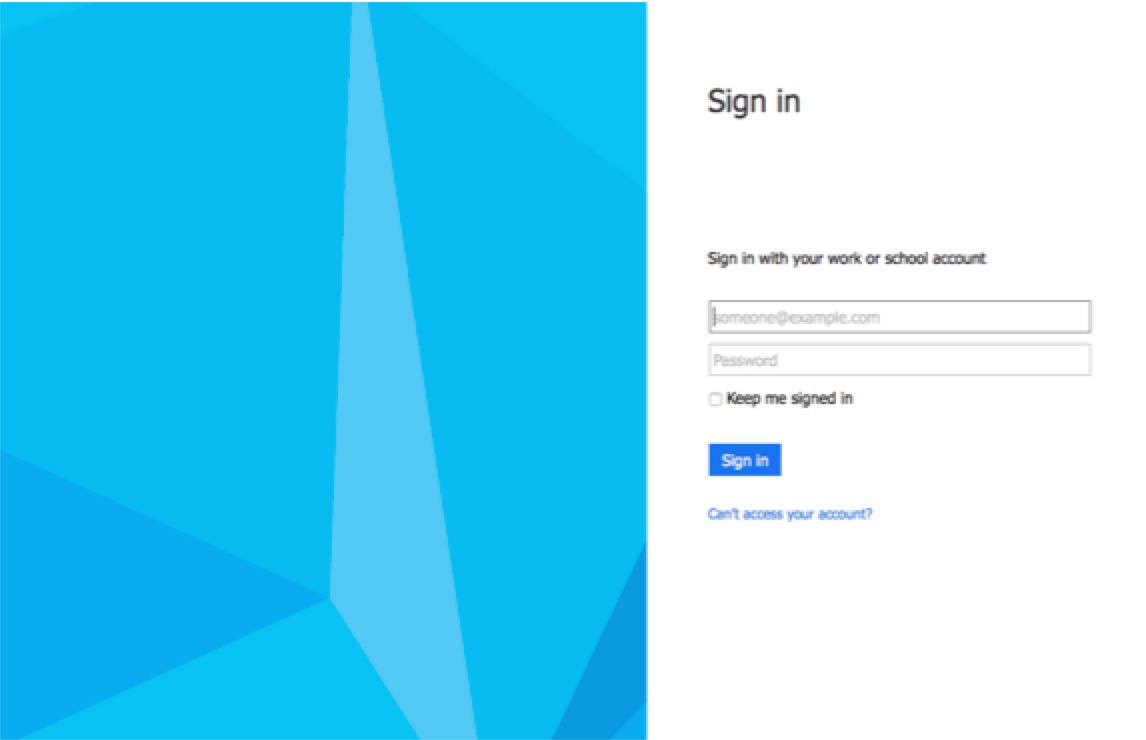
In your internet browser, go to http://help.shoreline.edu. This will bring you to the log in screen that looks like this image below:

Screen Shot 2015-01-30 at 4.44.04 PM

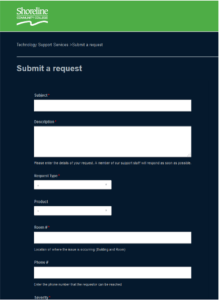
Just sign in with your shoreline.edu email address and password. You will come to a screen where you can submit a request in a format that looks like the one below:

Screen Shot 2015-01-30 at 4.46.26 PM

This portal will keep you abreast of the status of your ticket, will enable our technicians to request additional information if necessary and will allow TSS staff to collaborate more efficiently to resolve your requests or issues. It will also give the TSS department a way to track and report on metrics and trends to allow us to be proactive and improve on the high level of customer service we already provide.

Implementing this system is currently still in development but it is our hope that this system will be a more helpful and efficient way to service the needs of Shoreline Community College as well as enable us to streamline our work flow.

You may begin using the new Zendesk system for all your technology needs as the old Work Order system is being retired.   The email address for Zendesk is: support@shoreline.zendesk.com

The Helpline Phone number at 206-546-5872 will still be in service, but we encourage you to please submit a ticket and refer to that ticket when calling the Helpline number.

Any questions? Please don’t hesitate to ask.

Thanks, Your Technology Support Services Team