Ride the wave and refer students to come SEA us!

Dear Campus:

The Shoreline Early Alert (SEA) team would like to thank staff and faculty for continuing to refer students to academic intervention, support, and services! We are currently at over 160 (domestic and international) SEA referrals…that’s over double where we were at this point last quarter! Thank you for continuing to support our students and connecting them to resources.

Since an early alert works best when it’s early, this is a reminder that May 9th is the last day a “W” grade is issuedso there is still time to refer students for intervention. Examples of SEA referrals include: 

  • Low test scores
  • Unexplained excessive absenteeism or tardiness
  • Pacing in an online class
  • Not doing assignments
  • Financial matters
  • External concerns

What happens next:
After our team receives a referral a member will work to respond within 24 hours to both you and the student. We continue to reach out to the student in order to set up an initial meeting where we assess the student’s needs and most appropriate resources. *REMINDER: Intervention is a process and may not produce immediate results. Our goal is to reach out to the student early in the quarter and connect them to the appropriate resources.*

Visit our site to learn more about SEA or to view our Referral Form.

We look forward to continuing to work with you and to support our students!

Thanks,
Nicki Sunwall, Erin Wilson, Lianne Almughirah, Jennifer Coogan

Shoreline Early Alert (SEA) Flyer 2016[2]

Accessibility tip of the day: ADA Compliant Astronomy Lab

As we conclude Accessibility Action Week, today’s post is about another innovation in accessibility happening on our campus.

Jim Hughes, Shoreline Astronomy faculty, is collaborating with Astronomy faculty from Arizona State University and Spokane Colleges to create an accessible astronomy lab here at Shoreline.

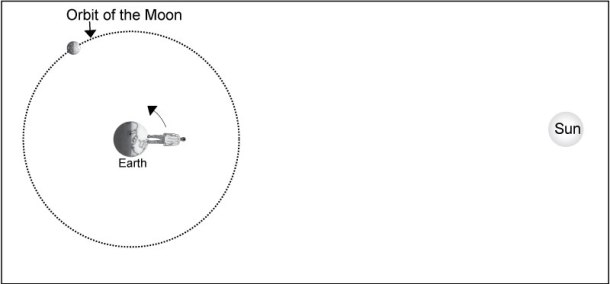
ASU has developed ADA compliant descriptions for the images in Starry Night lab software so that students with low/no vision can hear (via assistive technology) what is being shown in the image. This is no easy task!

Here is an example:

“The figure shows the Sun on the right and Earth on the left. The orbit of the Moon is shown as a dotted circular path, and one location for the Moon is labeled. The illustration shows that one-half of the Moon’s surface is illuminated by sunlight. A person is placed on Earth such that it is noon (the Sun is directly overhead). Earth’s rotation is indicated by a curving counterclockwise arrow.” See example below:
orbit
If you are interested in learning more about this project, please contact Jim Hughes at jhughes@shoreline.edu.

Thanks for your enthusiasm and support this week! Our last and most exciting Accessibility Action Event is happening today!! Don’t miss it!

“Digital Accessibility in Higher Ed: Risk Assessment, Responsibility and Benefits”
with special guest Dr. Janet Sedgley, University of Montana
11:30 a.m. – 12:30 p.m., PUB Quiet Dining Room
Presentation Description:  It feels like a new buzz phrase – digital accessibility.  Those steeped in it, throw the term around daily.  Most others don’t find the term very accessible (aka approachable).  More individuals are starting to understand a little about how to create accessible Word documents and that web images require alt tags.  We have added more steps to our work processes. Why?

Let’s take a step back and get a general view of what’s happening with higher education and digital accessibility.  Is it truly an issue that needs our attention, how involved are each of us and what is higher education’s return on investment as far as digital accessibility.

UDOIT Tool available in Canvas beginning Thurs., April 28

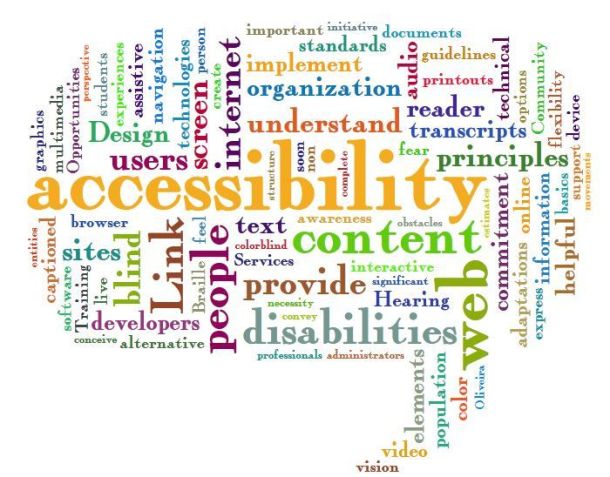
accessibility
As part of Accessibility Action week, we are thrilled to announce that we are one of the first SBCTC colleges to be able to put the UDOIT tool into our Canvas instance!

What is UDOIT? UDOIT is a tool that can quickly check your full course for Accessibility.  It also provides information on how to fix any issues that make viewing/using your content difficult or impossible for someone using a screen reader or other assistive device.  For example, it will show you how to add styles to your text and alternative text on your images and tables.

As of this Thursday, April 28, you will see it in the left hand navigation in your Canvas classes.  It’s a “teacher only” tool so students will not be able to see it.

If you would like to learn more, please join us Thurs., April 28 for a UDOIT Party in Room 4214 from 1:30-3 p.m.! We will show you how to use the UDOIT tool and then let you try it on your own courses. In addition, the Accessibility FLC has put together a handy checklist if you want to check your course that way. FLC Members will be present to help you quickly make improvements.

If you have any questions, please ask!

Campus events for Thurs., April 28: AFA Portfolio Show, Accessibility workshop, and more

These are the events happening around campus for Thurs., April 28.

Intramural Zumba, Athletics Room 3025
Thurs., April 28: 12:35-1:25 p.m.
This intramural Zumba is free to all students, faculty, and staff of Shoreline Community College.

Seattle University School of New and Continuing Studies Info Session, Online
Thurs., April 28: 1 p.m.
Interested in pursuing your Seattle University bachelor’s degree online? Join Tyler Fox in an info session and learn more about the Digital Cultures B.A. and Organizational Leadership B.A.

To RSVP for this event, please e-mail jlee@shoreline.edu. You will receive a confirmation e-mail with a website link to enter the online session.

UDOIT Party, Room 4214
Thurs., April 28: 1:30-3 p.m.
accessibility
What does UDOIT mean?! It is finally easy for anyone to check their Canvas classroom for accessibility. UDOIT is a great new tool that is inside Canvas – a few clicks and it has checked your full course for Accessibility. It also provides information on how to fix the issues!  Our FLC has also put together a handy checklist if you want to check your course that way.  FLC Members will be present to show you how to use the tools and to help you quickly make improvements.

Hope to see you there!

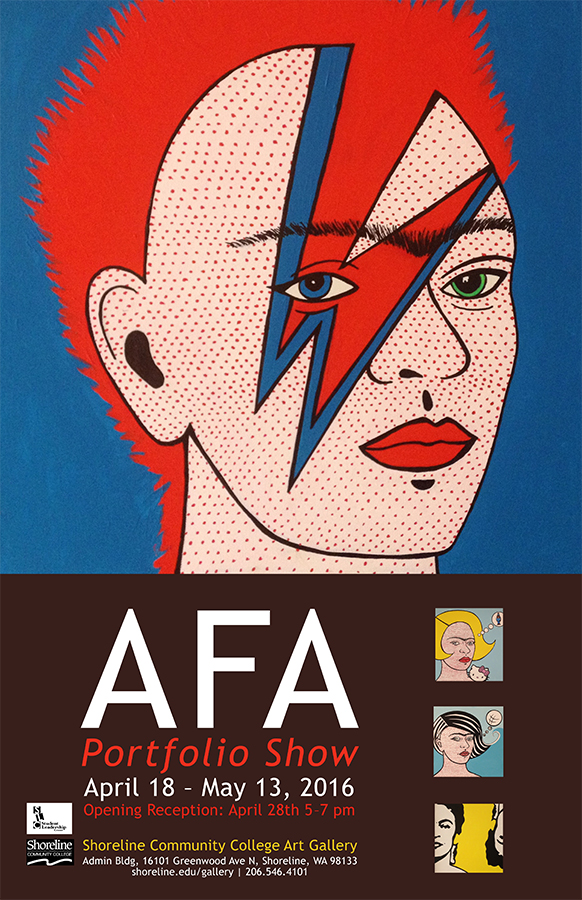
SCC Art Gallery – AFA Portfolio Show, 1000 bldg. Lobby
Thurs., April 28: 5-7 p.m.
afa portfolio show flier
The current graduates of Shoreline’s Associate of Fine Art Degree will present the finest samples of their work in painting, drawing, printmaking, graphic design, photography, sculpture and ceramics. Shoreline offers two direct transfer degrees with concentration in the visual arts: an AFAS in studio art, and an AFAP in photography. SCC Art Gallery is proud to present this group exhibition of up-and-coming artists to the greater Seattle arts community.

Intramural Personal Training, Athletics Room 3007
Thurs., April 28: 6:05-6:50 p.m.
Intramural personal training sessions are free to all students, faculty, and staff of Shoreline Community College.

The Future of Kurdistan, Room 1010M
Thurs., April 28: 6:30-8 p.m.
Part of the Great Discussions series. For more information, click here.

Reminder: Shoreline’s Teaching & Learning Conference is Fri., April 29

Just a reminder about the Shoreline Teaching & Learning Conference on Friday, April 28! We’ve updated the agenda a little so please have a look at the agenda here! Please also notice that one of the sessions includes a speaker from UMT on Accessibility to dovetail with Accessibility Week.

We have the lunch orders in, but if you still want to come for lunch, please bring a brownbag and join us for the rest of the conference. We understand if you can only come for one or two hours of the conference, we would still love to share with our very busy colleagues.

And if you want to continue with all the great opportunities for professional learning, consider joining SeLC (Shoreline eLearning Community) for their monthly meeting in 4214 after lunch.