Verizon Tower Update

Dear Campus Community,

Beginning Wednesday, May 3rd, there will be work on the Verizon tower located west of Bldg. 1600. For the first portion of the work, it will be contained within the tower fencing area with little to no impact to campus. Beginning Monday May 15th through Friday May 19th, the area on the map highlighted in red will be coned off as various lifts and a crane are brought in for the last leg of the work.

The loudest impact to campus will be the diesel engines of the crane and rigs that are used to work at height on the tower. The vast majority of work being conducted will be with hand tools so there should be minimal audible disruptions.
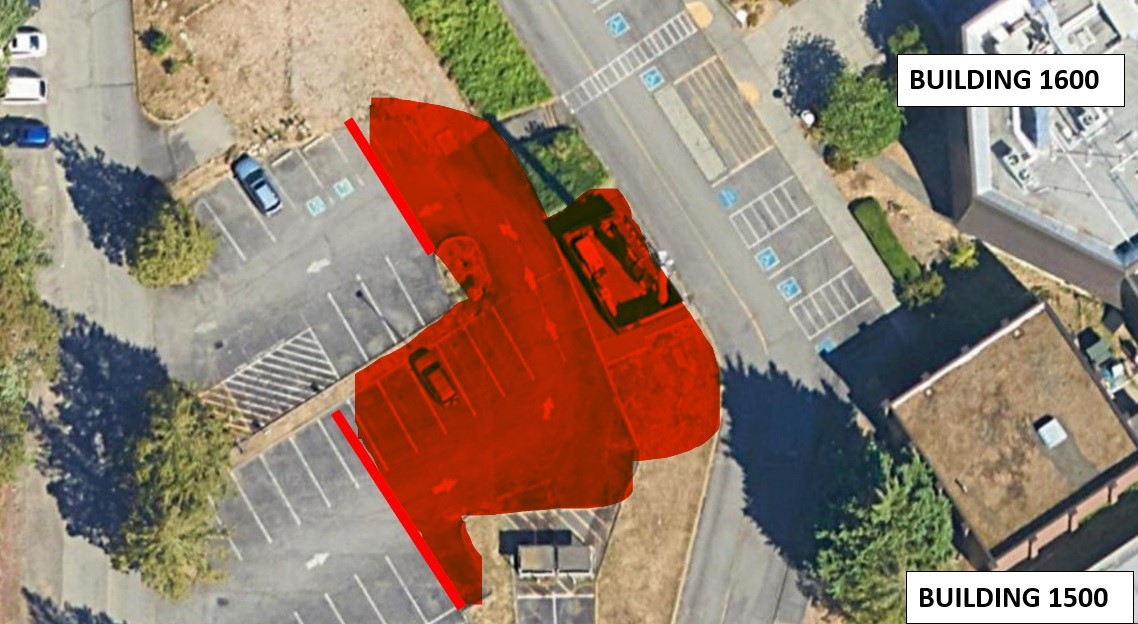
This is an image that show the impacted area between 1500 and 1600

Construction Work until 5/12

Attention Campus Community,

We will have some construction work taking place on the east and north side of the 2300 building starting 4/24 through 5/12.  This work will be broken down into two phases.  For Phase 1, Forma will be excavating a trench on the east pedestrian path of 2300 (highlighted in orange) from 4/24 to 5/5.  The path will be plated to provide crossing for pedestrians.  The trench will be protected with a barricade and fence.  Once this area is completed the path will be returned to its existing condition.  For Phase 2, Forma will be excavating a trench on the north pedestrian path of 2300 (highlighted in yellow) from 5/1 to 5/12.  This work will generate some construction noise.  The path will be plated to provide crossing for pedestrians.  One ADA parking stall will be temporarily relocated.  The trench will be protected with a barricade and fence.  Once this area is completed the path will be returned to its existing condition.  All doors to 2300 will remain open.  

Please reach out to Kimberlee Clark (kclark@shoreline.edu) if you have any questions.  

Thank you for your patience as we work to complete the HSAMCC project.

SCC Facilities

Return of the Building Marshall Program

Dear Colleagues,

Shoreline is re-instating the Building Marshal (formerly Building Monitor) program. Being a Building Marshal is completely voluntary, and while there is no additional pay, you will be provided with training and a CPR/AED/First Aid certification through the Red Cross. Building Marshal’s will be tasked with assisting with building evacuations in case of an emergency, as well as acting as an extra pair of eyes to spot safety hazards before they can cause injury. There will be multiple Building Marshal’s assigned to each building to allow for coverage even when someone is out sick, on vacation, or traveling for work. Building Marshals will:

  • Be issued a backpack that contains a safety reflective vest, hard hat, binder with emergency operation tips and processes, and a standard first aid kit.
  • Be given CPR/AED/First Aid training by a certified Red Cross instructor
  • Be given training on how to use and where to find Stryker chairs
  • Be responsible to assist with evacuations in the event of the emergency
  • Report to Safety & Security when they observe safety hazards in their areas (lights that are out, exposed wires, AEDs/fire extinguishers that appear tampered with
  • Be physically able to assist persons that require said assistance during evacuations 

If you are interested in becoming a Building Marshal, please copy and paste the prompts below and answer all in an email your to gcranson@shoreline.edu

  1. First and Last Name:
  2. Shoreline Email Address:
  3. Building and Office Number:
  4. What days and times are you physically on campus?
  5. Are you willing to be the Building Marshal for a building other than your own if needed?
  6. Are you able to perform CPR, utilize a Stryker chair to evacuate those with mobility issues, and assist with other evacuation processes?”

System Outage Update 4/17/23

Good afternoon, 

Today I want to send a huge thank you out to the entire TSS team for their continued work on the restoration process.  We appreciate you all so much! 

I have several important updates to share with you, so please make sure you read carefully.

Wi-Fi 

TSS is in the middle of restoration efforts which include Wi-Fi access on campus. When wireless is operational in your area you will see a network called Shoreline-Guest-WiFi.  Please use the password  #ShorelineWiFi when you login. As full restoration efforts will take quite some time, TSS has brought on Shoreline’s brand-new guest network as a temporary solution to allow the campus to have internet access again.  

Barring any unforeseen issues TSS is hoping to have the network Wi-Fi online across campus by the end of the week. Currently wireless connectivity can be found in the following buildings, with more coming online soon. 

  • 800, 1000, 1100, 1200, 1300, 1400, 1500  

TSS will be removing the hotspots once your area’s wireless is online later this week. 

Broken Links 

If you are on the Shoreline website and you encounter a broken link, please fill out this form. 

File Restoration 

As the restoration efforts continue, one way that TSS is hoping to help support you is by inspecting computers to see what files can be recovered. Please be aware that due to current ongoing efforts, this process is still a few weeks out. To help identify systems for file review, TSS has created a form that must be filled out so that the college can prioritize those review requests. 

TSS Offie Closed Periodically 

To help with restoration efforts, the TSS office will need to be closed periodically throughout the next few weeks. A sign will be on their door, and a notification sent out to campus when that occurs. If you need to pick up equipment and the office is closed, please contact TSS to set up an appointment. 

The TSS office will be closed tomorrow, Tuesday, April 18, 2023. 

I mentioned in the Zoom forum today that we have provided a robust FAQ list for our external call center. Here are some questions and answers from that list that you might find helpful.  Thank you for your time and have a great night! 

Cat 

Call Center FAQs 

What happened? 

  • On March 20, 2023, Shoreline Community College experienced a ransomware incident that impacted several on-campus operations. Shoreline immediately transitioned to a virtual environment to ensure continuity of classes with minimal disruptions. Students and faculty maintained access to several necessary resources to continue the educational experience. The investigation is ongoing, but to date we learned that some data was accessed by an unauthorized third party. 

When did this happen? 

  • The unauthorized person obtained certain files from our systems between February 27 and March 20, 2023. 

Why didn’t you tell affected individuals about the loss of the data sooner? 

  • With any such event, it takes time to investigate the event and identify individuals whose information may be involved. Shoreline worked hard to notify you as quickly as possible. 

What information about me may have been involved? 

  • The investigation is ongoing, but to date we learned that some data was accessed by an unauthorized third party between February 27 and March 20, 2023. On April 5, 2023 we confirmed that the documents involved contained certain information relating to some of our students, staff, and faculty, including their names and one or more of the following data elements: Social Security numbers, passport numbers, driver’s license numbers, dates of birth, financial account numbers, and/or attestations regarding COVID-19 test results. To date, we have received no reports of identity theft as a result of this incident. 

Was any data impacted or compromised? 

  • The investigation is ongoing, but to date we learned that some data was accessed by an unauthorized third party between February 27 and March 20, 2023. On April 5, 2023 we confirmed that the documents involved contained certain information relating to some of our students, staff, and faculty, including their names and one or more of the following data elements: Social Security numbers, passport numbers, driver’s license numbers, dates of birth, financial account numbers, and/or attestations regarding COVID-19 test results. To date, we have received no reports of identity theft as a result of this incident. 

Has the affected information been misused? 

  • At this time, there is no evidence that there has been any misuse of the information involved in this event. 

What monitoring resources are available to me? 

  • Shoreline is offering a complimentary membership in Experian® IdentityWorksSM Credit 3B to anyone whose information Social Security number or driver’s license number may have been 

involved in the incident. This product helps detect possible misuse of your personal information and provides you with identity protection services focused on immediate identification and resolution of identity theft. IdentityWorks Credit 3B is completely free to you and enrolling in this program will not hurt your credit score. You may also call the toll-free number of Experian, Equifax, or TransUnion to place a fraud alert on your credit report and/or order your free credit report. Additional resources regarding identity theft protection may be found at the Federal Trade Commission (FTC) identity theft website, IdentityTheft.gov, which includes information regarding identity theft recovery steps and how to file an identity theft complaint if you discover your information has been compromised. 

How can I sign up for the credit monitoring? 

  • Information about how to sign up for these services is contained in the notice that was emailed to you. However, I’m happy to help you. 

How long will my credit monitoring last? 

  • Shoreline is providing individuals with [one year] of complimentary credit monitoring services.  

What steps are you taking to protect my information? 

  • We are continuing to take taking several steps to ensure increased security including: enabling multifactor authentication, moving to a cloud-based file solution, enforcing a mandatory password reset every 90 or 180 days, mandating complex passwords, reviewing and revising email forwarding rules to ensure privacy of sensitive information, updating hardware and ensuring compliance with best practice security standards, and implementing additional security measures on all Shoreline controlled machines. 

What other steps should I take to protect my information? 

  • We advise individuals to remain vigilant for signs of unauthorized activity by reviewing their credit reports and financial account statements. If you see charges or activity they did not authorize, Shoreline suggests they contact their financial institution immediately. Shoreline is in the process of providing notice of this incident to individuals whoseinformation may have been involved and is offering them a complimentary membership to Experian® IdentityWorksSM Credit 3B credit monitoring service. 

How can I get a copy of my credit report? 

  • You can contact one of the three major credit reporting agencies to obtain free credit reports and/or place fraud alerts and security freezes on your credit files.
    • Experian PO Box 9554 Allen, TX 75013 1-888-397-3742 
    • TransUnion P.O. Box 2000 Chester, PA 19016 1-888-395-6938 
    • Equifax PO Box 105069 Atlanta, GA 30348-5788 1-888-298-0045 

System Outage Update 4/6/23 

Good evening, 

I have two quick updates for you today. 

Personal Hotspots 

During today’s Zoom forum we received questions about whether people could use their personal hotspot on campus. While we do have wifi hotspots distributed around campus, it is also possible to use your personal hotspot on your phone if you choose to do so.  

However, I wanted to share that a handful of us with “unlimited” data plans who’ve used our cell phones as wi-fi hotspots while on campus this week, discovered that “unlimited” can have limits, after getting the “your smartphone has 10% remaining of its mobile hotspot allowance” messages from our wireless carriers. Here are a couple of tips and explanations that may be of use to you 

  • “A lot of people get confused about unlimited data plans, thinking that this means that mobile hotspot data is also unlimited. But, this isn’t the case. Even on cell phone plans with unlimited data, there will be a cap for how much data you can use as a mobile hotspot.” (Statement pulled up from a web search.) 

  • “One of the most important things to remember about mobile hotspot usage is that it can quickly drain your smartphone’s battery. While it is being used as a hotspot, not only is it doing all its other smartphone functions, but it’s also constantly transmitting data to the devices you connect to it.” (Statement pulled up from a web search.) 

Maintenance Requests 

While our intranet is down, staff and faculty are able to put in maintenance requests via this link: https://dlweb.megamation.com/shorelinecc/DLWEB.php/O4W_INFO_PAGE 

Please note that due to the ransomware incident we are not currently able to take requests for heating/cooling as we are currently unable to access our HVAC system controls. 

Have a great night!