System Outage Update 4/28/23

Happy Friday! 

I hope you have been able to take a little time out of your day today to enjoy the sunshine. It is certainly beautiful around campus. If you haven’t stepped outside today, take a look at the latest post on Shoreline’s Instagram page to see the campus in full bloom.

Today I have a couple of updates for you from Technology Support Services (TSS) and on accreditation. 

First, I want to thank you all for your patience and flexibility during this time. We are making great progress getting things back online, but we know that everyone has had to work very hard to make adjustments to instruction, and operations.  We truly appreciate your efforts. 

TSS 

As TSS continues to forge ahead with restoration efforts they would like to remind you to continue to fill out the file recovery request form which can be found here. They are in the final testing stage and hope to begin working with individual computers as early as the end of next week. Please remember this request form is not to ask for files on the network drives (e.g. S, X etc.) but instead for things you might have saved on your individual computer. 

Accreditation 

Due to the effect of the ransomware incident on accreditation work, the following deadlines have been extended and timelines adjusted: 

  • All Area Reviews are now due Friday, June 16, 2023 – the last day of spring quarter. The April 24th deadline for Area Reviews was extended. 
  • Next year’s (2023-24) budget now will be developed two months later, as approved by the Board of Trustees at their April 26, 2023 meeting. A draft budget will be reviewed by the Board in August; it will be shared with the Strategic Planning & Budget Council during Opening Week, when faculty are back on contract. A final budget will be presented to the Board for approval in September. 
  • Since Area Reviews will inform resource allocation (budget development), that timeline has been updated.  
  • The Fall 2023 (October 5-6) Accreditation Mid-Cycle visit has been approved by the Northwest Commission on Colleges & Universities (NWCCU) to be delayed to spring 2024.  

Enjoy your weekend! 
System Outage Update 4/17/23

Good afternoon, 

Today I want to send a huge thank you out to the entire TSS team for their continued work on the restoration process.  We appreciate you all so much! 

I have several important updates to share with you, so please make sure you read carefully.

Wi-Fi 

TSS is in the middle of restoration efforts which include Wi-Fi access on campus. When wireless is operational in your area you will see a network called Shoreline-Guest-WiFi.  Please use the password  #ShorelineWiFi when you login. As full restoration efforts will take quite some time, TSS has brought on Shoreline’s brand-new guest network as a temporary solution to allow the campus to have internet access again.  

Barring any unforeseen issues TSS is hoping to have the network Wi-Fi online across campus by the end of the week. Currently wireless connectivity can be found in the following buildings, with more coming online soon. 

  • 800, 1000, 1100, 1200, 1300, 1400, 1500  

TSS will be removing the hotspots once your area’s wireless is online later this week. 

Broken Links 

If you are on the Shoreline website and you encounter a broken link, please fill out this form. 

File Restoration 

As the restoration efforts continue, one way that TSS is hoping to help support you is by inspecting computers to see what files can be recovered. Please be aware that due to current ongoing efforts, this process is still a few weeks out. To help identify systems for file review, TSS has created a form that must be filled out so that the college can prioritize those review requests. 

TSS Offie Closed Periodically 

To help with restoration efforts, the TSS office will need to be closed periodically throughout the next few weeks. A sign will be on their door, and a notification sent out to campus when that occurs. If you need to pick up equipment and the office is closed, please contact TSS to set up an appointment. 

The TSS office will be closed tomorrow, Tuesday, April 18, 2023. 

I mentioned in the Zoom forum today that we have provided a robust FAQ list for our external call center. Here are some questions and answers from that list that you might find helpful.  Thank you for your time and have a great night! 

Cat 

Call Center FAQs 

What happened? 

  • On March 20, 2023, Shoreline Community College experienced a ransomware incident that impacted several on-campus operations. Shoreline immediately transitioned to a virtual environment to ensure continuity of classes with minimal disruptions. Students and faculty maintained access to several necessary resources to continue the educational experience. The investigation is ongoing, but to date we learned that some data was accessed by an unauthorized third party. 

When did this happen? 

  • The unauthorized person obtained certain files from our systems between February 27 and March 20, 2023. 

Why didn’t you tell affected individuals about the loss of the data sooner? 

  • With any such event, it takes time to investigate the event and identify individuals whose information may be involved. Shoreline worked hard to notify you as quickly as possible. 

What information about me may have been involved? 

  • The investigation is ongoing, but to date we learned that some data was accessed by an unauthorized third party between February 27 and March 20, 2023. On April 5, 2023 we confirmed that the documents involved contained certain information relating to some of our students, staff, and faculty, including their names and one or more of the following data elements: Social Security numbers, passport numbers, driver’s license numbers, dates of birth, financial account numbers, and/or attestations regarding COVID-19 test results. To date, we have received no reports of identity theft as a result of this incident. 

Was any data impacted or compromised? 

  • The investigation is ongoing, but to date we learned that some data was accessed by an unauthorized third party between February 27 and March 20, 2023. On April 5, 2023 we confirmed that the documents involved contained certain information relating to some of our students, staff, and faculty, including their names and one or more of the following data elements: Social Security numbers, passport numbers, driver’s license numbers, dates of birth, financial account numbers, and/or attestations regarding COVID-19 test results. To date, we have received no reports of identity theft as a result of this incident. 

Has the affected information been misused? 

  • At this time, there is no evidence that there has been any misuse of the information involved in this event. 

What monitoring resources are available to me? 

  • Shoreline is offering a complimentary membership in Experian® IdentityWorksSM Credit 3B to anyone whose information Social Security number or driver’s license number may have been 

involved in the incident. This product helps detect possible misuse of your personal information and provides you with identity protection services focused on immediate identification and resolution of identity theft. IdentityWorks Credit 3B is completely free to you and enrolling in this program will not hurt your credit score. You may also call the toll-free number of Experian, Equifax, or TransUnion to place a fraud alert on your credit report and/or order your free credit report. Additional resources regarding identity theft protection may be found at the Federal Trade Commission (FTC) identity theft website, IdentityTheft.gov, which includes information regarding identity theft recovery steps and how to file an identity theft complaint if you discover your information has been compromised. 

How can I sign up for the credit monitoring? 

  • Information about how to sign up for these services is contained in the notice that was emailed to you. However, I’m happy to help you. 

How long will my credit monitoring last? 

  • Shoreline is providing individuals with [one year] of complimentary credit monitoring services.  

What steps are you taking to protect my information? 

  • We are continuing to take taking several steps to ensure increased security including: enabling multifactor authentication, moving to a cloud-based file solution, enforcing a mandatory password reset every 90 or 180 days, mandating complex passwords, reviewing and revising email forwarding rules to ensure privacy of sensitive information, updating hardware and ensuring compliance with best practice security standards, and implementing additional security measures on all Shoreline controlled machines. 

What other steps should I take to protect my information? 

  • We advise individuals to remain vigilant for signs of unauthorized activity by reviewing their credit reports and financial account statements. If you see charges or activity they did not authorize, Shoreline suggests they contact their financial institution immediately. Shoreline is in the process of providing notice of this incident to individuals whoseinformation may have been involved and is offering them a complimentary membership to Experian® IdentityWorksSM Credit 3B credit monitoring service. 

How can I get a copy of my credit report? 

  • You can contact one of the three major credit reporting agencies to obtain free credit reports and/or place fraud alerts and security freezes on your credit files.
    • Experian PO Box 9554 Allen, TX 75013 1-888-397-3742 
    • TransUnion P.O. Box 2000 Chester, PA 19016 1-888-395-6938 
    • Equifax PO Box 105069 Atlanta, GA 30348-5788 1-888-298-0045 

System Outage Update 4/6/23 

Good evening, 

I have two quick updates for you today. 

Personal Hotspots 

During today’s Zoom forum we received questions about whether people could use their personal hotspot on campus. While we do have wifi hotspots distributed around campus, it is also possible to use your personal hotspot on your phone if you choose to do so.  

However, I wanted to share that a handful of us with “unlimited” data plans who’ve used our cell phones as wi-fi hotspots while on campus this week, discovered that “unlimited” can have limits, after getting the “your smartphone has 10% remaining of its mobile hotspot allowance” messages from our wireless carriers. Here are a couple of tips and explanations that may be of use to you 

  • “A lot of people get confused about unlimited data plans, thinking that this means that mobile hotspot data is also unlimited. But, this isn’t the case. Even on cell phone plans with unlimited data, there will be a cap for how much data you can use as a mobile hotspot.” (Statement pulled up from a web search.) 

  • “One of the most important things to remember about mobile hotspot usage is that it can quickly drain your smartphone’s battery. While it is being used as a hotspot, not only is it doing all its other smartphone functions, but it’s also constantly transmitting data to the devices you connect to it.” (Statement pulled up from a web search.) 

Maintenance Requests 

While our intranet is down, staff and faculty are able to put in maintenance requests via this link: https://dlweb.megamation.com/shorelinecc/DLWEB.php/O4W_INFO_PAGE 

Please note that due to the ransomware incident we are not currently able to take requests for heating/cooling as we are currently unable to access our HVAC system controls. 

Have a great night! 

System Outage Update 4/4/23

Subject: System Outage Update 4/4/23 

Good evening, 

Thank you for all the thoughtful questions we received at today’s Zoom forum. If you have any questions you’d like to send ahead of time before the next one later this week, please feel free to send them to cchiappa@shoreline.edu 

TSS 

A huge thank you to TSS for their effort and hard work during this time. As they continue to work to try to bring things back online, we ask that you please have patience, and that you make sure you are sending your requests for assistance through your supervisor. This will help streamline the process and communication to ensure that everyone is getting the help they need. 

Parking Updates 

Staff/faculty parking permit requests for PT employees may be sent by department admin, any FT parking permit requests will need to be approved/verified by dean, director, etc. Please e-mail staff/faculty parking permit requests to: mames@shoreline.edu  

Staff/faculty may pick up their parking permit at our front lobby during business hours with photo ID once the request has been sent in (pending verification/approval for FT employees). 

Employee Carpool parking permits need to be renewed each quarter. Please stop by our front lobby in person for renewal with photo ID during business hours. 

Front Lobby Hours: 

Monday-Thursday: 9am-4pm 

Friday: 9am-3pm 

Office Closed: 12pm-1pm (Daily) 

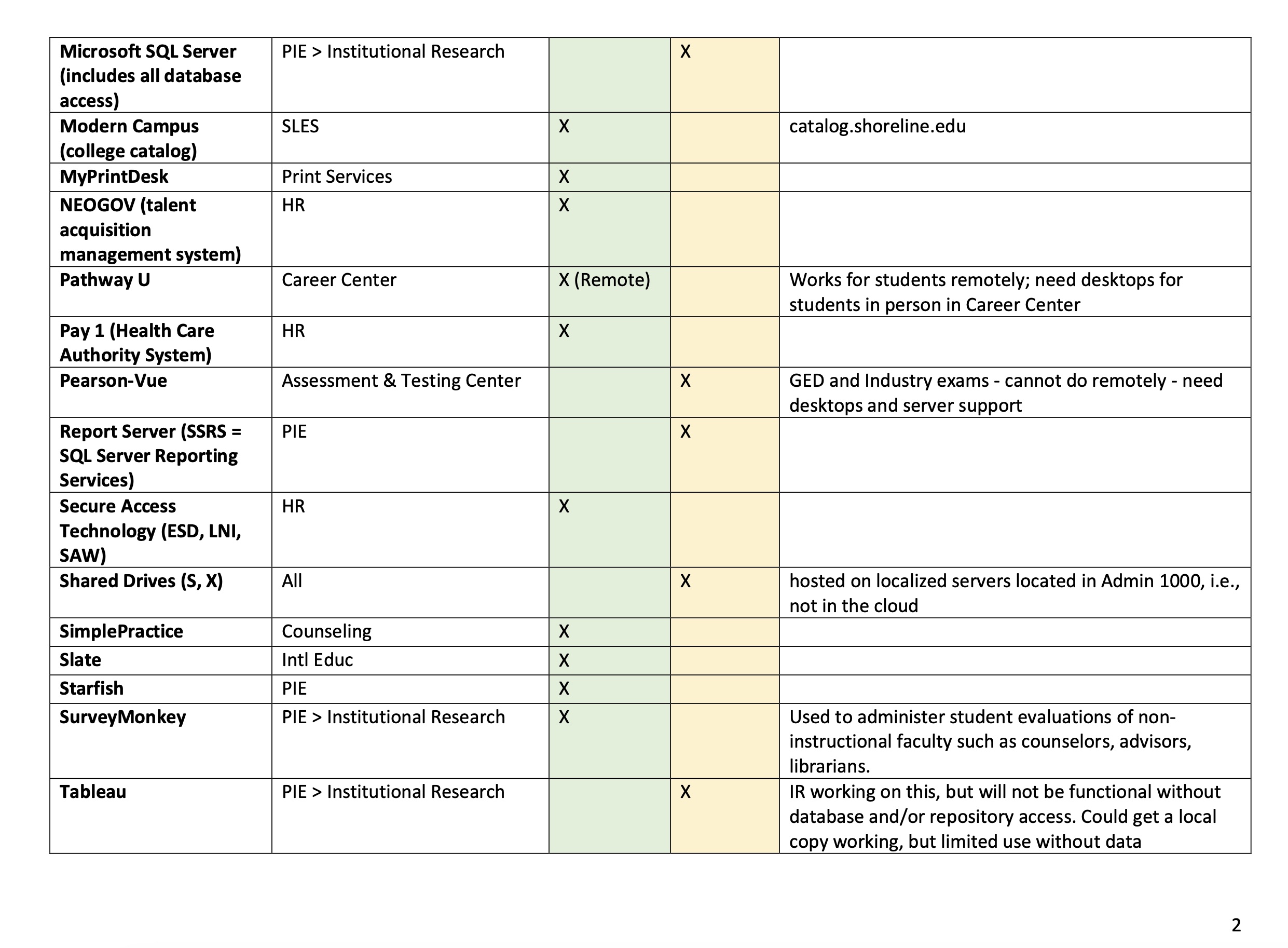
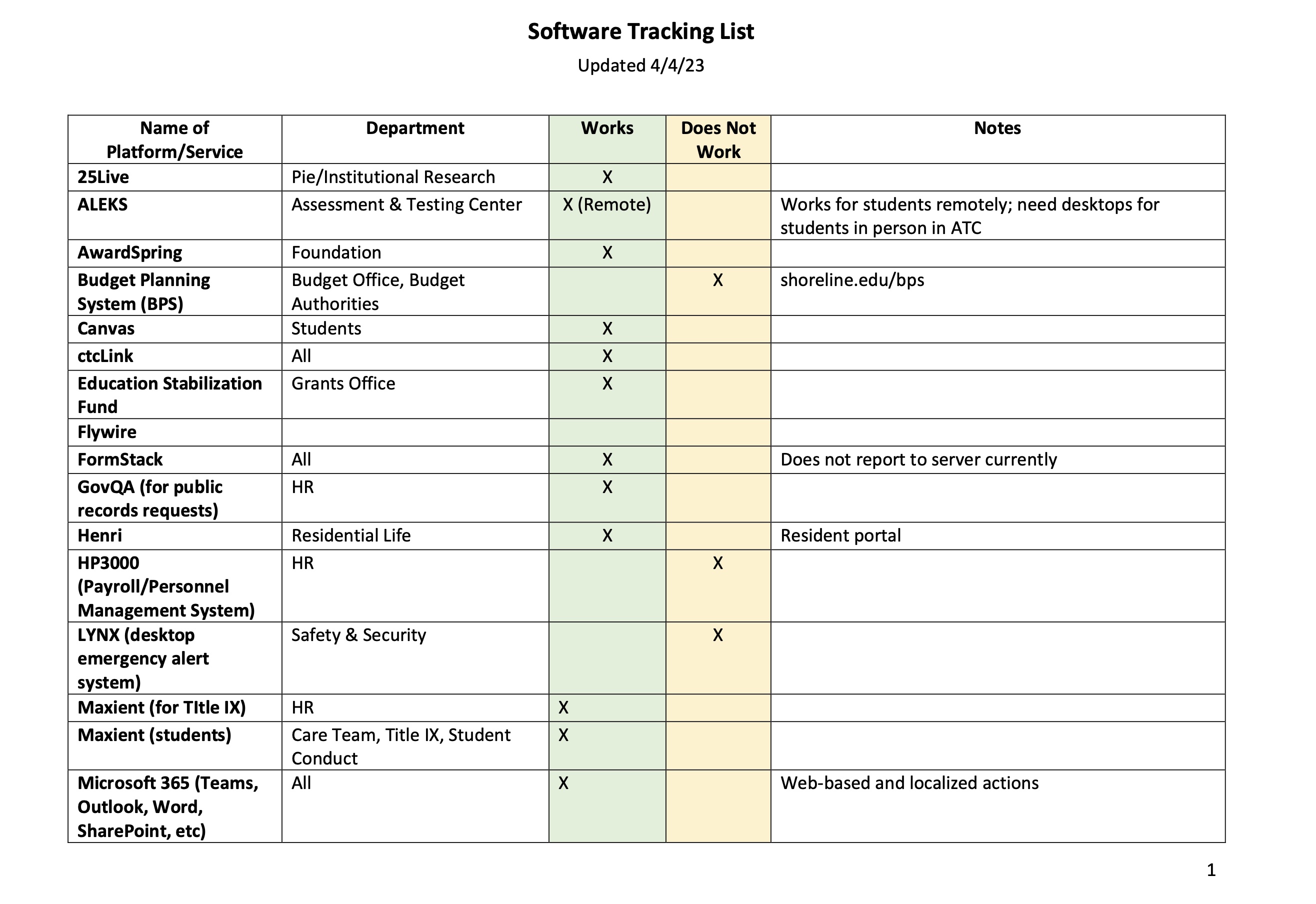
Software Tracking List 

Thank you to everyone who contributed to the software tracking list. I am including it below. This should help to act as a quick and easy reference to see what is currently working/not working. Apologies for the wonky formatting of these images. I have also included this as an attachment that will be going out in an All-Staff e-mail tonight as well if you’d like to see it all in one file.

Have a great night! 

Systems Outage Update 4/3/23

Good afternoon,

Today I have a few quick updates for you.

CtcLink Student Communication

In case you receive any questions, I wanted to let you know that this morning we sent out an e-mail to all current students, as well as a RAVE alert asking them to check their e-mail for an important update. The e-mail informed students that we will now be using ctcLink logins to access Canvas starting today at 12:00pm. We also gave them an updated calendar of spring dates.

Correct Shoreline Support Center Link

On Friday we sent an e-mail to Faculty with some important information for the spring quarter. However, we have since learned that the link for the Shoreline Support Center was incorrect. Thank you to those who pointed out the error. My apologies. Here is the correct link for the site.

Hotspot Troubleshooting

If you are experiencing any challenges with hotspot connectivity in your area, please unplug the hotspot device, leave it unplugged for about 10 seconds, and then plug it back in.

Enjoy your evening!

Cat Chiappa

Executive Director of Strategic Communications and Marketing