Help Desk planned downtime and transition to new system 11/16/22

Hello Shoreline Community,

Exciting news! Shoreline Community College is moving to a new Support Center as announced earlier (Help Desk Transition DAAG Article from Oct 31). The Support Center (support.shoreline.edu)  is where you find helpful articles and submit requests. Now we can include more departments and provide better support to our students, staff, and faculty.

Here is the timeline for the transition between the two systems:

  • On Wednesday, November 16th from 7am until 1pm, Shoreline Support Center (support.shoreline.edu) will be offline while we migrate to the new system. 
  • During this time, please use one of the following options to get assistance:
  • For ctcLink, Password, Canvas, and other issues that can be resolved with a 1:1 virtual session please join our Zoom room at www.shoreline.edu/ZoomRoom.
  • If you are on campus and need in-person assistance:
    • Hardware, Software, Wi-Fi, etc.: please visit TSS in lower level of Library, Room 4122
    • Enrollment Services & Financial Aid: Please visit Enrollment Services
    • eLearning Services & Classroom Support Services: Please visit eLearning in 1200 Building
    • Continuing Education & Rentals: Please visit eLearning in 1200 building
  • For security change requests, network account setup, etc. we ask that you please hole the request until migration is complete to avoid risk of your request getting delayed.
  • On November 16th TSS will send out a campus announcement once the move is completed stating that the migration is now complete.
  • Starting the afternoon of the 16th you will see emails stating that your requests were moved to the new system. Please have patience as agents move them over and adjust to the new system.

Have questions about the new Support Center? Please visit a Q&A using

Thanks,

Gavin Smith
Acting Director
Technology Support Services

Shoreline Community College

New Technology Support Center Helpdesk Software Coming

What’s happening

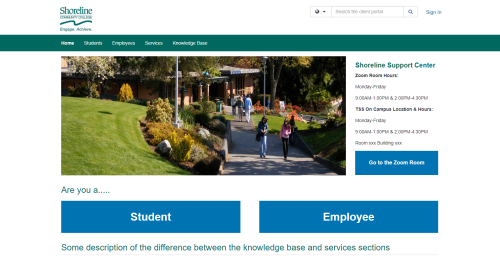
Shoreline Support Center image searchbar
  • The software that runs the current support center is called Zendesk.
  • Later this month TSS will replace Zendesk with new software called TeamDynamix. This is currently scheduled to happen on November 19.
  • It has the same features as Zendesk but will look somewhat different.
Shoreline Support Center image student or employee help services buttons

What will change?

Why is this being done?

  • Since ctcLink was implemented many more support agents have been added to the help desk software
  • TeamDynamix is more cost effective and allows us to add many more support agents
  • This will also make it possible for us to provide help desk services in parts of the college currently using older ways of helping people such as e-mail
  • TeamDynamix will also support services we haven’t had in the help desk software before, such as inventory and project management
  • This project supports TSS’ ongoing efforts to improve service in the department and for the rest of the college

Thanks,

Gavin Smith
Acting Director
Technology Support Services

CTCLINK SERVICE RESTORED

What is happening: SBCTC has reported and we have confirmed that ctcLink logins are functioning normally again and service has been restored.

Scope of effect: All campus employees and students

Event date: Monday, October 3

Expected resolution time: Completed

Persons affected: Campus employees and students

Services affected:

  • Access to ctcLink for students and employees

Thanks,

Gavin Smith
Acting Director
Technology Support Services

CTCLINK SERVICE INTERRUPTION

What is happening: ctcLink logins are hanging and not allowing login. SBCTC Director of ctcLink Support Dani Bundi has acknowledged the issue and says managed services is working on a solution. They will update us when there is a solution, and we will inform the campus as more is known.

Scope of effect: All campus employees and students

Event date: Monday, October 3

Expected resolution time: Not known

Persons affected: Campus employees and students

Services affected:

  • Access to ctcLink for students and employees

Thanks,

Gavin Smith
Acting Director
Technology Support Services

Employee accounts will start requiring login verification on Tuesday, July 26

What’s Happening?

Starting Tuesday, July 26, all employee accounts will require secondary verification when logging in to Microsoft applications. That means when you log in you will be asked to answer a text, phone call, or a prompt in an app to verify that it is you logging in. We call this Multi-Factor Authentication (MFA). Most people will be familiar with this by now since many banks and other organizations now require verification when logging in. We already use it here for some employees.

Why are we doing this?

Scammers and other malicious organizations are intensifying their efforts to break into computers and networks, often by stealing usernames and passwords. Once this happens they can send malicious emails, lock network files, or take over whole systems. When a second prompt is required to log in, bad actors can’t make use of a login name and password because they can’t answer the second prompt. The federal government and the Chief Information Officer for the state of Washington have urged all colleges to quickly increase their security by implementing MFA given geopolitical and other threats, so we are proceeding as are other colleges.

How will this work?

The first time you log into a Microsoft application using your Shoreline network account starting Tuesday, July 26, you will be asked to set up the way you would like to do your secondary authentication. This could be with a text or a phone call, but we recommend using the Microsoft Authenticator app for most people since it will be the easiest to use. For complete details see this helpdesk article: What is Multifactor Authentication (MFA) for employee email and Microsoft products? – Shoreline Support

Note: some employees are already using MFA, so if you already do this you can expect to see no change.

What if I have trouble?

As always, if you need technology assistance you can get help by looking up a help desk article or submitting a support ticket at Shoreline Support.

Thanks,

Gavin Smith
Acting Director
Technology Support Services

Shoreline Community College
www.shoreline.edu  |  206.546.4792 
4000 Building Room 4124
Pronouns: he, him, his