Faculty/Staff Email Moving to the Cloud

TSS is in the process of updating @shoreline.edu email accounts from an on-premise system to one that is cloud based. For the staff of TSS, this will alleviate having to manage physical servers. For faculty and staff, email will likely continue to be what everyone knows and loves, but there might be some slight changes along the way.

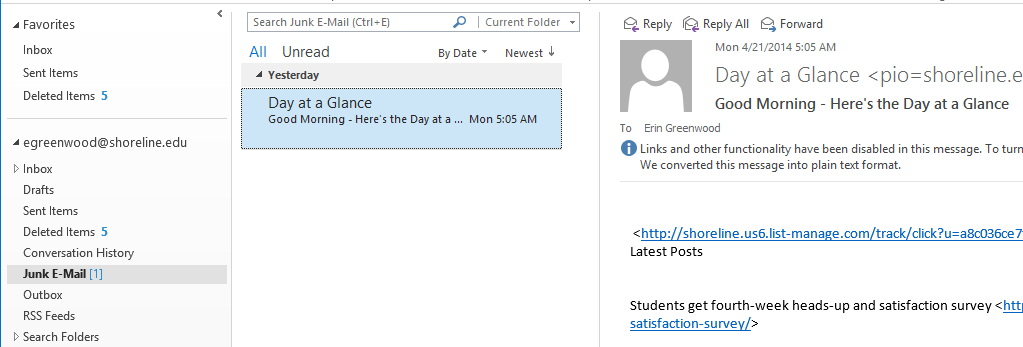
Yesterday we notified users that postini had been disabled. As a result, today users might have seen some messages filtered into Junk E-mail. Below is a real-life example: Today I found that the Day At A Glance email message went to the Junk E-mail folder.
JunkEmail


Here is what you can do to correct messages that have inaccurately gone to the Junk folder.

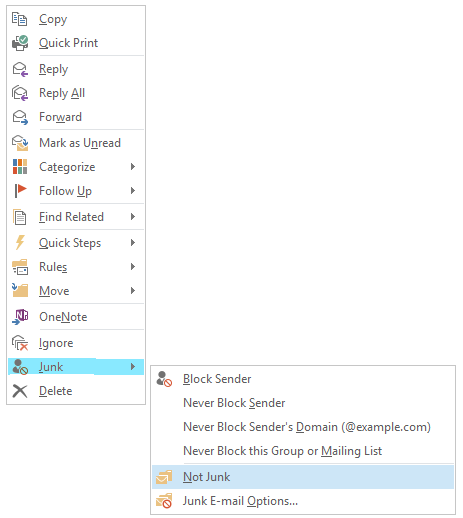
  • Right Click on the Message that is not Junk. The following menu is displayed:
NOTJunk

  • From the menu, hover on “Junk” and then click “Not Junk”
  • The message will be moved back into the usual folder–the Inbox or to another folder if a rule is in place.
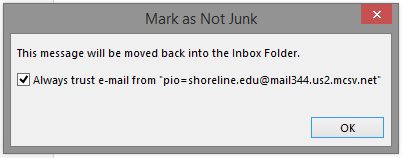
  • Outlook will provide an option for similar messages to skip the Junk folder in the future:
mark as not junk

Building Monitor Training on April 25

In the event of an emergency, Building Monitors are full-time employees who volunteer to assist the an Incident Commander and Campus Security in the implementation of Shoreline’s Emergency Response Plan.  The Building Monitor Training and Duties describe the qualifications and duties of the position.

There will be a full training on Friday, April 25, from 10:30-12 p.m. in the PUB Quiet Dining Room. This is a repeat of first training. If you are interested in being a Building Monitor, please attend this Friday. If you’ve already attended, you do not need to attend this one.

For additional information, please contact Robin Blacksmith at ext., 4503 or rblacksmith@shoreline.edu

Faculty & Staff Email Update

Faculty and staff with @shoreline.edu email accounts will have access to Office 365, SharePoint, and Exchange Online (not yet, but it’s coming!). In preparation for these services, it was necessary to disable Postini today in order to implement a different tool. Email service will continue without disruption of service.

TSS will keep you notified of any important changes as the conversion to these services continues.

Spring Skate: Frozen

frozenThe Asian Student Association of Shoreline Community College is hosting Frozen Spring Skate on Friday, April 25,  from 2- 5 p.m. at Highland Ice Rink.

The cost varies depending on how big of a group attends. Skate rentals are $3.50 per pair, per person, for all public sessions.

Don’t forget to contact us so we can have a head count of how many people will be attending!

Dress warmly with gloves, hat, warm jacket, and anything else you can think of to make you feel warm. This is your chance to ice skate and have some fun! Come meet new friends. You don’t need to know how to skate.

Meet us in the PUB lobby this week if you have any questions or go to the event page on ECHO.

Notice for Mac Users accessing Email through Outlook 2011

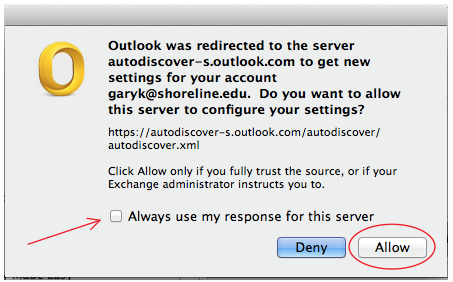
Mac users using Outlook 2011 may see the following dialog. This is expected.

Check the box “Always use my response for this server” and click Allow.

McOutlook