System Outage Update March 28, 2023

Good afternoon, 

Today I just have one quick update for you. 

Sentinel Security Update 

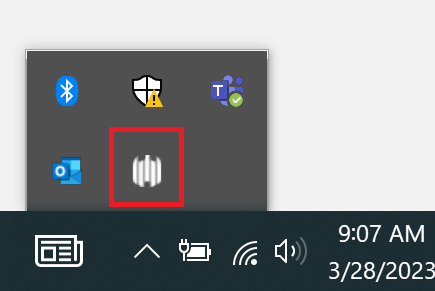
Yesterday TSS deployed a security update for Windows laptops called Sentinel. We have received several questions asking how you can tell if it has been installed. All computers who have Sentinel installed have an icon in the task bar area. It tells that agent successfully installed and it looks like the image (five white curved lines in a row at varying levels in height) in the picture below.
Have a great night! 

System Outage Update March 27, 2023

Good afternoon, 

Zoom Forum 

Tomorrow we are hosting another campus forum via Zoom at 10:00am PST. As we did last week, we will open the floor for operational questions. If you have a question you’d like to submit, please e-mail it to cchiappa@shoreline.edu by 9:00am tomorrow 3/28/23. 

New Security Software for Laptops 

Today TSS deployed a new security software on Windows laptops called Sentinel. You will see two (2) notifications on your laptop as this occurs indicating the deployment of Sentinel and another confirming when Sentinel is deployed.  

This update is for your laptop only. Please do NOT use your desktops at this time, and continue to leave them unplugged/without a power source.  

As a general guideline, TSS recommends rebooting your machine at least once a week. 

If you have questions about this, please contact support@shoreline.edu.  

One Drive 

We have received several questions specific to OneDrive. Please note that OneDrive Instructions have been updated for both Mac and Windows machines and can be found here. 

FAQS 

Our FAQs have been updated on the support.shoreline.edu site. We will continue to update them throughout the week. 

Have a great night! 

System Outage Update March 24, 2023

Good afternoon,

First of all, I want to say a huge congratulations to the faculty of our Nursing Program for graduating the largest class ever yesterday, with forty new nurses proudly walking across the stage!

Media Inquiries

Yesterday we had several media outlets visit campus, and we did issue a press release about the ransomware incident. As a gentle reminder, please note that all media inquiries or questions should be funneled directly through Cat Chiappa, our new Executive Director of Strategic Communications and Marketing. The reason for this is that the investigation is ongoing, and we want to make sure that we are streamlining all updates and communication for consistency.

Wi-Fi Hotspots

In other news, TSS has deployed Wi-Fi hotspots throughout campus and are working to make them as effective as possible. We hope to have a map showing their locations around campus early next week.

OneDrive

We have received several questions about how to restore a OneDrive, and detailed instructions can be found here

CybersecurityRecommendations

Many of you have asked about best practices for general cybersecurity. Here are a few recommendations to consider:

  • Remember to stay vigilant against suspicious communications. If you receive an email, text or phone call from a sender you do not recognize, do not respond, open the messageor download attachments. Only click on links or attachments from emails you trust. If you think you have received a suspicious communication, please let your supervisors know so that TSS may assist you.
  • Always use strong passwords. Strong passwords typically include a combination of letters, numbers, and symbols. Do not repeat or use the same passwords across accounts.
  • It is always advisable to regularly review and monitoryour accounts. If you notice any unusual activity, it is recommended that you contact that account institution immediately.

FAQs

Lastly, we received several great questions in today’s Zoom meeting. We will continue to update the FAQ list next week, and you can find the current iteration here.

Enjoy your weekend!

Jack Kahn

Systems Outage Update- March 23rd 9:00pm

Systems Outage Update March 23, 2023 

Good evening, 

Today I want to give you a couple of quick operational updates from our TSS team. 

Office Desktops: Please make sure that department desktops are powered down and unplugged.  Our settings will power the computers back on in the morning if they are not unplugged. 

Computer Peripherals and Accessories: If you need to work remotely, you may bring monitors, cables, or any other necessary technological accessory home to use with your laptop. Please make sure you notify your supervisor. 

Have a great night! 

Cat Chiappa 

Executive Director of Strategic Communications and Marketing 

support@shoreline.edu 

Campus Updates 03/23/23

EVENTS AND NEWS  

Well, folks it’s been a whirlwind this week.  As you all know, we are dealing with a ransomware situation.  There is a lot of information out there (and by the time you read this there should be a FAQ update available on the web).  All I can say at this point is how impressed I am with our TSS team, Bill Saraceno and his folks getting connected with Insurance, Legal & Cybersecurity support, Student Services, our Academic Deans coming up with great creative strategies to move through the next weeks, the Faculty for their continued dedication to serving students, our Staff for flexibility and continued support and strategies, and so many more. The resiliency of this campus is impressive and so appreciated.   

While this has taken almost every minute of the last few days, I did have some great meetings prior to this with community partners.  I met with Bristol Ellington, the new City Manager of Shoreline, to discuss possible partnerships. I also met with new colleagues from the Tibetan Association of Seattle who are wanting to partner with us in various ways.  Stay tuned for more on that as it develops! 

Did you get a chance to see the art exhibit in the “Admin” building?  If not, please stop by.  The event last week was so moving and inspirational.  Also, I got a chance to see some of our talented music students perform.  Such a pleasure to be surrounded by so many talented folks.  It’s important, particularly in times of crisis (as we are in now), to take a breath and celebrate these wonderful events on campus.  Thank you to the faculty (and of course students!) that share them with us. 

Hope to see you on Friday with another update on the ransomware situation.  We will get through this. 

Cheers, 

Jack 

Accreditation Updates: 

Winter Quarter Updates 

ctcLink: 

  • Faculty Focus: How to Submit Grades in ctcLink 
  • Friday, March 24, 3-4pm  
  • Monday, March 27, 10-11am  
  • Tuesday, March 28, 2-3pm 
  • How employees can change pronouns and sexual orientation/gender identity (SOGI) in ctcLink.  
  • How students can change sexual orientation/gender identity (SOGI) in ctcLink. 

Human Resources 

Know someone who wants to join our team? Visit: Job Opportunities at Shoreline Community College 

Events and Updates 

Follow Shoreline Community College on social media! 

COVID-19 Updates   

Cases   

  • For the week of March 15 – March 21, the College only saw (1) positive case of COVID-19 reported. 
  • Even with the website down, the COVID-19 reporting form is still available at this link: Coronavirus (COVID-19) Exposure Report Form – Formstack, and a reminder that people experiencing symptoms, who have a positive test, or who were exposed to people with Covid should report it. 

News 

Questions?      

Shoreline Community College MISSION – Our Purpose 

We serve the educational, workforce, and cultural needs of our diverse students and communities.